Purpose/Overview
The Password Management Panel allows users to securely manage their login credentials, including updating their password and email address. This feature helps maintain account security and ensures user contact information stays current. It is intended for all users who need to update their authentication details or keep their account information up to date, reducing the risk of unauthorized access and communication issues.
Navigation Path:
To access this feature: My Preferences > Manage Preferences > Password Management Panel
Things to Know:
- Users must have access to their account settings to update password or email details.
- Changes made to password or email are applied immediately after saving.
- Ensure the new password meets system security requirements (if applicable).
- Updating the email address may affect login credentials and notifications.
Key Benefits/Use Cases:
- Improve Account Security: Regularly update passwords to prevent unauthorized access and enhance security.
- Update Contact Information: Ensure the correct email address is associated with the account for notifications and communication.
- Self-Service Management: Users can independently manage their credentials without requiring administrative support.
How It Works:
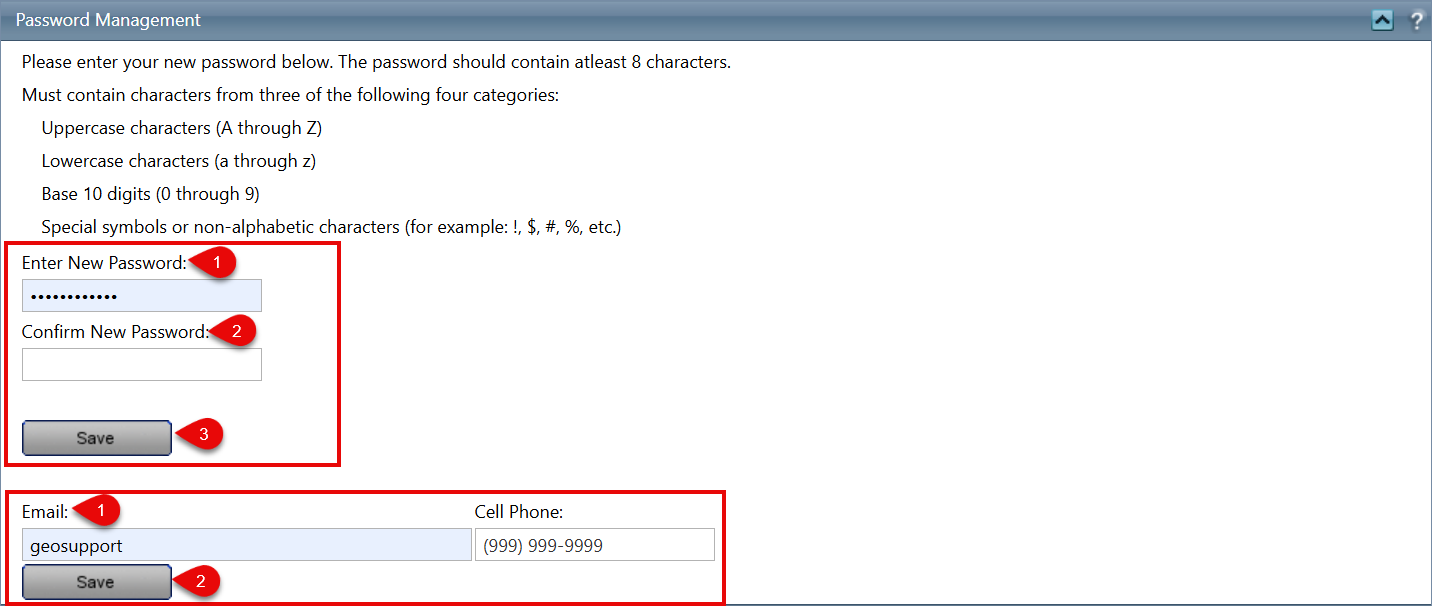
Change Password
Follow these steps to update your password:
- Enter the new password in the New Password field.
- Re-enter the new password in the Confirm New Password field.
- Click the Save button to apply the changes.
Change Email Address
Follow these steps to update your email address:
- Enter the new email address in the New Email Address field.
- Click the Save button to save the changes.
Related Features/Next Steps:
FAQ/Troubleshooting:
Q: What happens after I change my password?
A: Your new password is applied immediately, and you may need to use it the next time you log in.
Q: Can I use the same email address again?
A: Yes, but it must be valid and accessible for receiving notifications.
Q: What if I forget my new password after changing it?
A: Use the “Forgot Password” option on the login page to reset your password.
Questions? Contact us!

Was this article helpful?
That’s Great!
Thank you for your feedback
Sorry! We couldn't be helpful
Thank you for your feedback
Feedback sent
We appreciate your effort and will try to fix the article