Purpose/Overview
The password reset feature allows users to securely regain access to their account if they forget their password. It ensures minimal disruption by providing a self-service option to reset credentials without requiring administrative intervention. This feature is intended for all users and helps maintain account security while improving user convenience.
Navigation Path:
To access this feature: Login Page > Forgot Your Password
Things to Know:
- Users must have a valid Username and registered Email Address associated with their account.
- A password reset email will only be sent if the entered details match the system records.
- The reset link is typically time-sensitive and may expire after a certain period.
- If the email is not received, users should check their spam/junk folder.
- Alternatively, users can contact the IT Service Desk or System Administrator for manual password reset assistance.
Key Benefits/Use Cases:
- Forgot Password Recovery: Users can quickly regain access without waiting for admin support.
- Improved Security: Ensures that only verified users (via registered email) can reset passwords.
- Reduced Support Dependency: Minimizes IT service desk involvement for common login issues.
How It Works:
Follow these steps to reset your password:
- Step 1: Click “Forgot Your Password” on the login page.
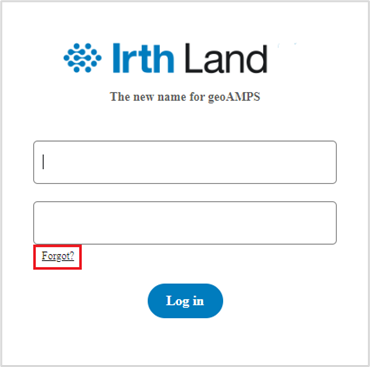
- Step 2: Enter your Username and Email Address.
- Step 3: Click Submit.
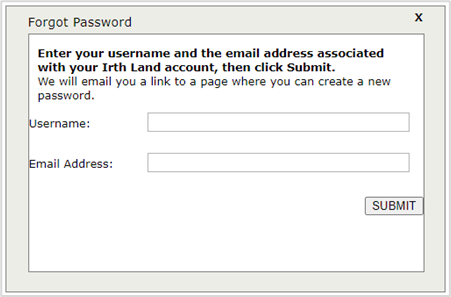
- Step 4: Check your email for the reset link.
- Step 5: Click the link and set a new password.
Related Features/Next Steps:
FAQ/Troubleshooting:
Q: I didn’t receive the password reset email. What should I do?
A: Check your spam or junk folder. If you still don’t see the email, ensure you entered the correct Username and Email Address, or contact the IT Service Desk.
Q: Can I reset my password without access to my email?
A: No, email verification is required. If you no longer have access to your email, contact your System Administrator for assistance.
Q: What should I do if the reset link has expired?
A: Repeat the password reset process to generate a new link.
Questions? Contact us!

Was this article helpful?
That’s Great!
Thank you for your feedback
Sorry! We couldn't be helpful
Thank you for your feedback
Feedback sent
We appreciate your effort and will try to fix the article