Purpose/Overview
The Generating Documents feature allows users to create documents specific to a Project, Parcel, or Agreement directly from within the system using the Document Generation panel.
This feature simplifies the process of producing standardized documents by using predefined templates and formats. It eliminates manual document creation, ensures consistency, and improves efficiency for users who need to generate reports or formal documents tied to specific records.
Navigation Path:
To access this feature: Project / Parcel / Agreement Module > Document Generation Panel
Things to Know:
- The visibility of the Document Generation panel is controlled by a system setting:
Administration > Application Behavior Settings > HideDocGenParcel key - If this setting is enabled, the Document Generation panel may be hidden from users.
- Ensure appropriate access/permissions are configured to view and use this panel.
Key Benefits/Use Cases:
- Use Case 1: Generate standardized documents for a specific project or parcel quickly, ensuring consistency across records.
- Use Case 2: Preview documents before final generation to verify accuracy and formatting, reducing errors and rework.
- Use Case 3: Easily produce agreement-related documents using predefined templates, improving operational efficiency and turnaround time.
How It Works:
Follow these steps to generate a document:
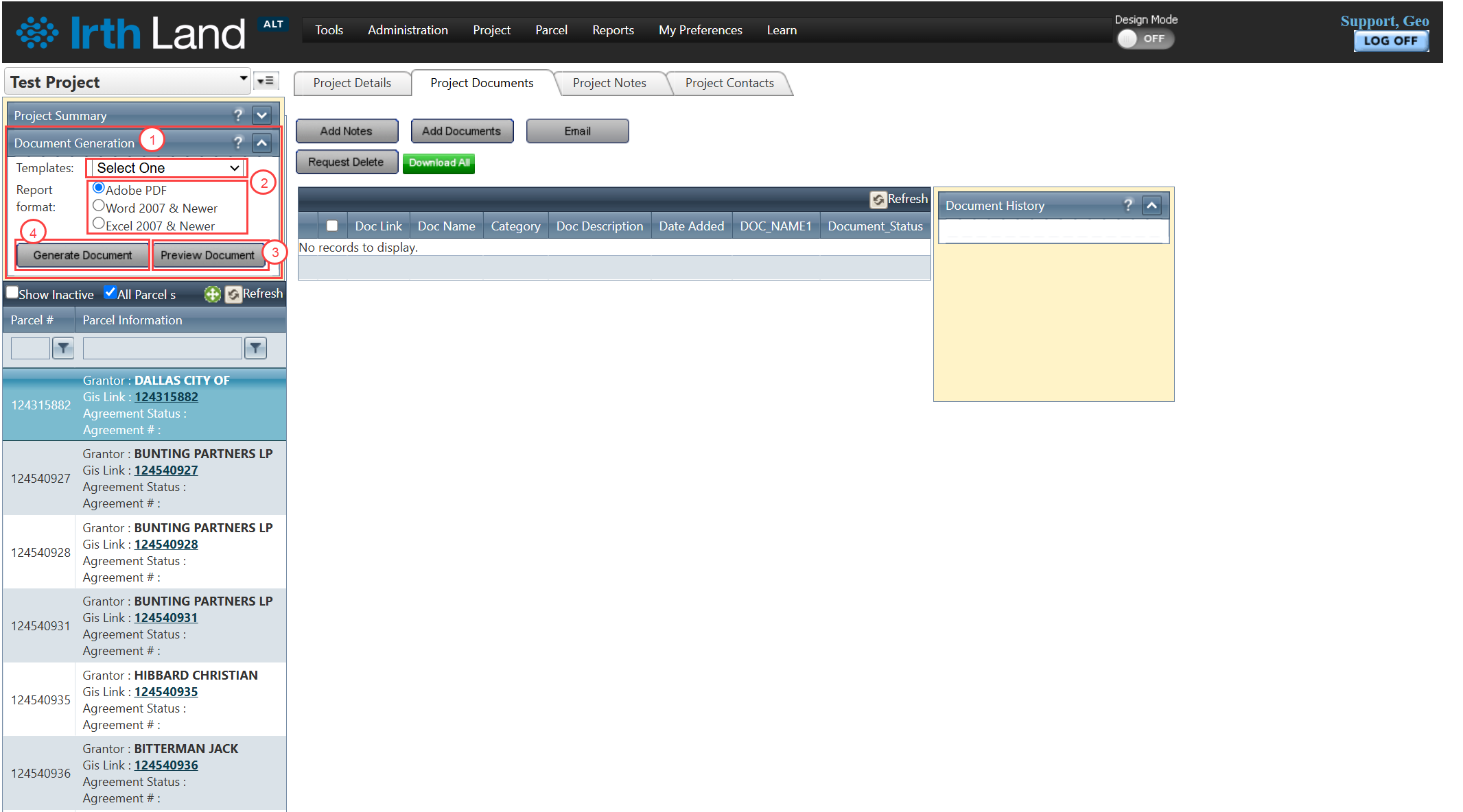
Step 1: Navigate to the Document Generation Panel within the desired Project, Parcel, or Agreement module.
Step 2: Select the required Template and Report Format from the available options.
Step 3: (Optional) Click Preview Document to review the document before final generation.
Step 4: Click Generate Document to create the final document.
FAQ/Troubleshooting:
Q: Why can’t I see the Document Generation panel?
A: The panel visibility may be disabled via the HideDocGenParcel setting in Application Behavior Settings. Contact your administrator to enable it.
Q: Can I preview a document before generating it?
A: Yes, use the Preview Document option to review the content and formatting before generating the final document.
Q: What modules support document generation?
A: Document generation is available in the Project, Parcel, and Agreement modules.
Questions? Contact us!

Was this article helpful?
That’s Great!
Thank you for your feedback
Sorry! We couldn't be helpful
Thank you for your feedback
Feedback sent
We appreciate your effort and will try to fix the article