Purpose/Overview
The Document Deletion Request feature allows users to request removal of documents while maintaining control and approval workflows.
Navigation Path:
Accessible from any Documents list
Things to Know:
- Documents cannot be deleted directly
- Deletion requires approval
- Notifications are sent for tracking requests
Key Benefits/Use Cases:
- Controlled Deletion: Prevent accidental data loss
- Approval Workflow: Ensure proper authorization
- Audit Compliance: Maintain deletion records
How It Works:
Requesting Deletion
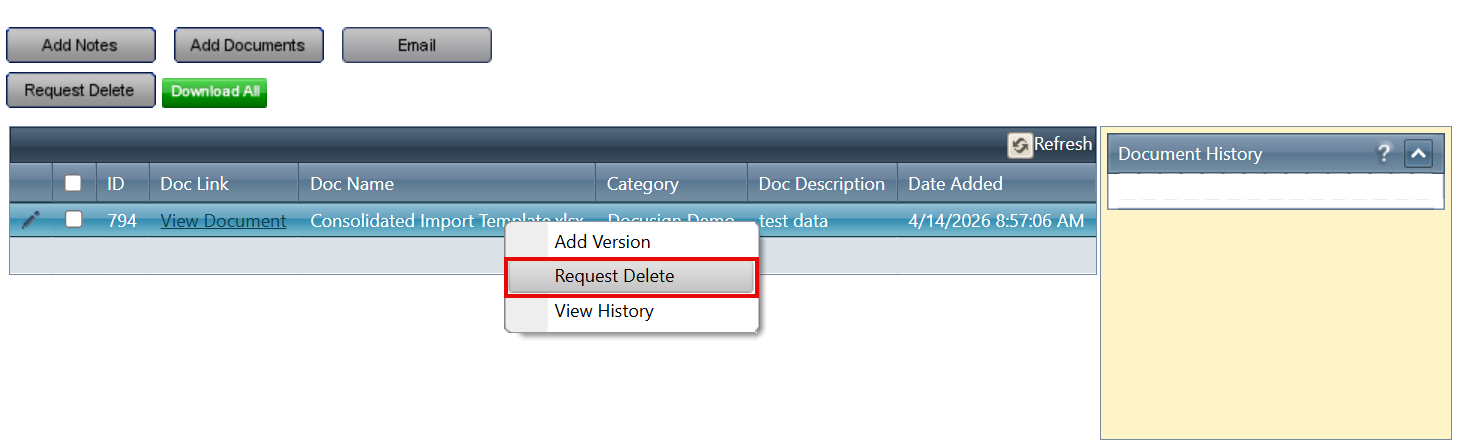
Step 1: Right-click the document
Step 2: Select Request Delete
Step 3: System creates a deletion request
Step 4: Request is sent for approval
Step 5: Notification appears on the dashboard
Related Features/Next Steps:
FAQ/Troubleshooting:
Q: Can I delete a document immediately?
A: No, deletion must go through an approval process.
Q: How do I know if my request is approved?
A: You will receive a notification on your dashboard.
Questions? Contact us

Was this article helpful?
That’s Great!
Thank you for your feedback
Sorry! We couldn't be helpful
Thank you for your feedback
Feedback sent
We appreciate your effort and will try to fix the article