UTTO Response Screen
Purpose/Overview
In this article, you'll learn about the UTTO response screen layout in Irth Mobile, how it improves response accuracy and speed, and what to expect the next time you respond to a UTTO ticket. The UTTO response screen has been updated to improve usability and accuracy when responding to tickets. The changes streamline how response information is entered and reviewed, helping users respond to UTTO tickets more quickly and with fewer errors. This update is intended for all users who respond to UTTO tickets as part of their day-to-day damage prevention workflow.
Navigation Path:
To access this feature: Tickets > Respond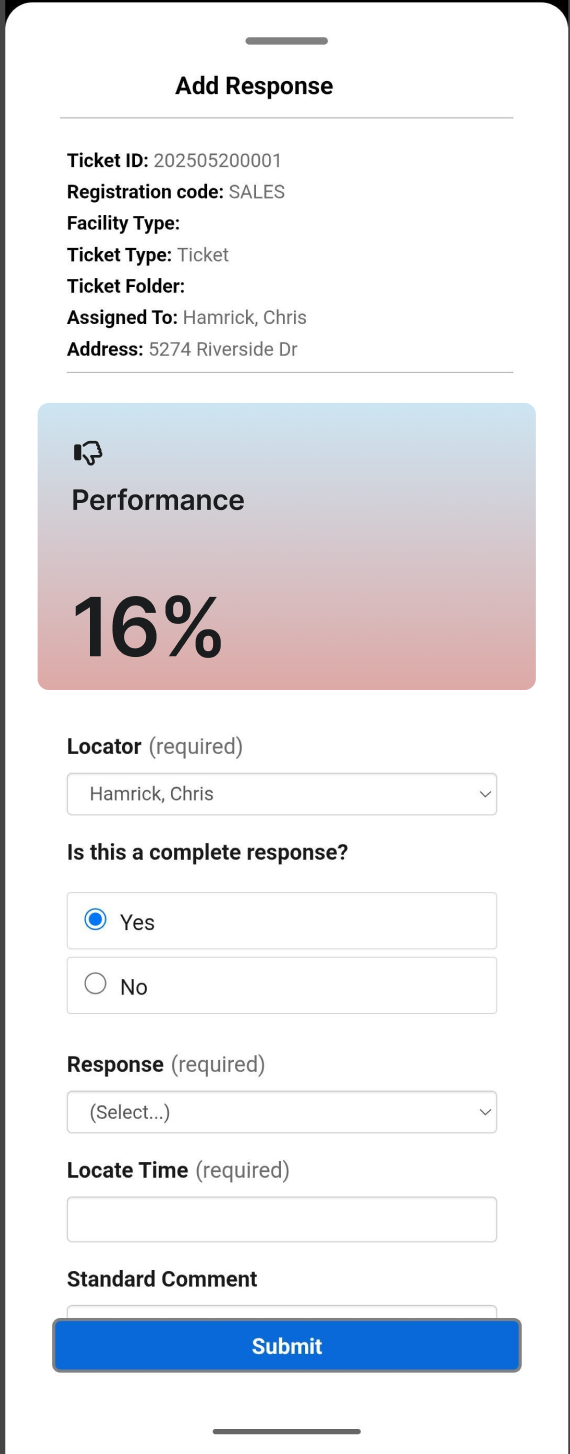
Things to Know:
- Responding to tickets requires standard ticket response permissions; no new permission is introduced by this change.
- The updated screen is available across all supported browsers (Chrome, Edge).
- Because the screen layout has changed, users familiar with the previous version should review the new field order and labeling before their next response.
Key Benefits/Use Cases:
- Faster ticket response entry: Field organization on the updated screen reduces the time it takes to locate and complete required response fields.
- Fewer response errors: Improved layout and validation help ensure responses are complete and accurate before submission, reducing rework and follow-up.
- Consistent response experience: Standardizing the response screen layout helps teams train new staff more easily and maintain consistent response quality across the organization.
How It Works:
Follow these steps to submit a response using the updated UTTO response screen:
- Open the UTTO ticket you need to respond to.
- Select Respond to open the response screen.
- Complete the required response fields using the updated layout.
- Review your entries for accuracy.
- Submit the response.
FAQ/Troubleshooting:
Q: Do I need any new permissions to use the updated UTTO response screen?
A: No. If you could respond to UTTO tickets before, you can continue to do so without any additional permission changes.
Q: Why does the response screen look different than before?
A: The screen layout was updated to improve usability and accuracy. Field labels and order may differ from the previous version, so it's a good idea to review the new layout before your first response after the update.
Q: What should I do if I notice a field is missing or behaving unexpectedly on the new screen?
A: Please reach out to support so the issue can be investigated.
Questions? Contact us!

Was this article helpful?
That’s Great!
Thank you for your feedback
Sorry! We couldn't be helpful
Thank you for your feedback
Feedback sent
We appreciate your effort and will try to fix the article