Purpose/Overview
The Void Payment workflow is used to cancel payments that have already been approved. This feature is particularly useful for organizations that process payments outside of the system and need to keep payment records synchronized between Irth Land and external accounting software.
Rather than deleting a payment record, the workflow updates the payment status to indicate that the payment is no longer valid, preserving a complete audit trail of payment activity.
Navigation Path:
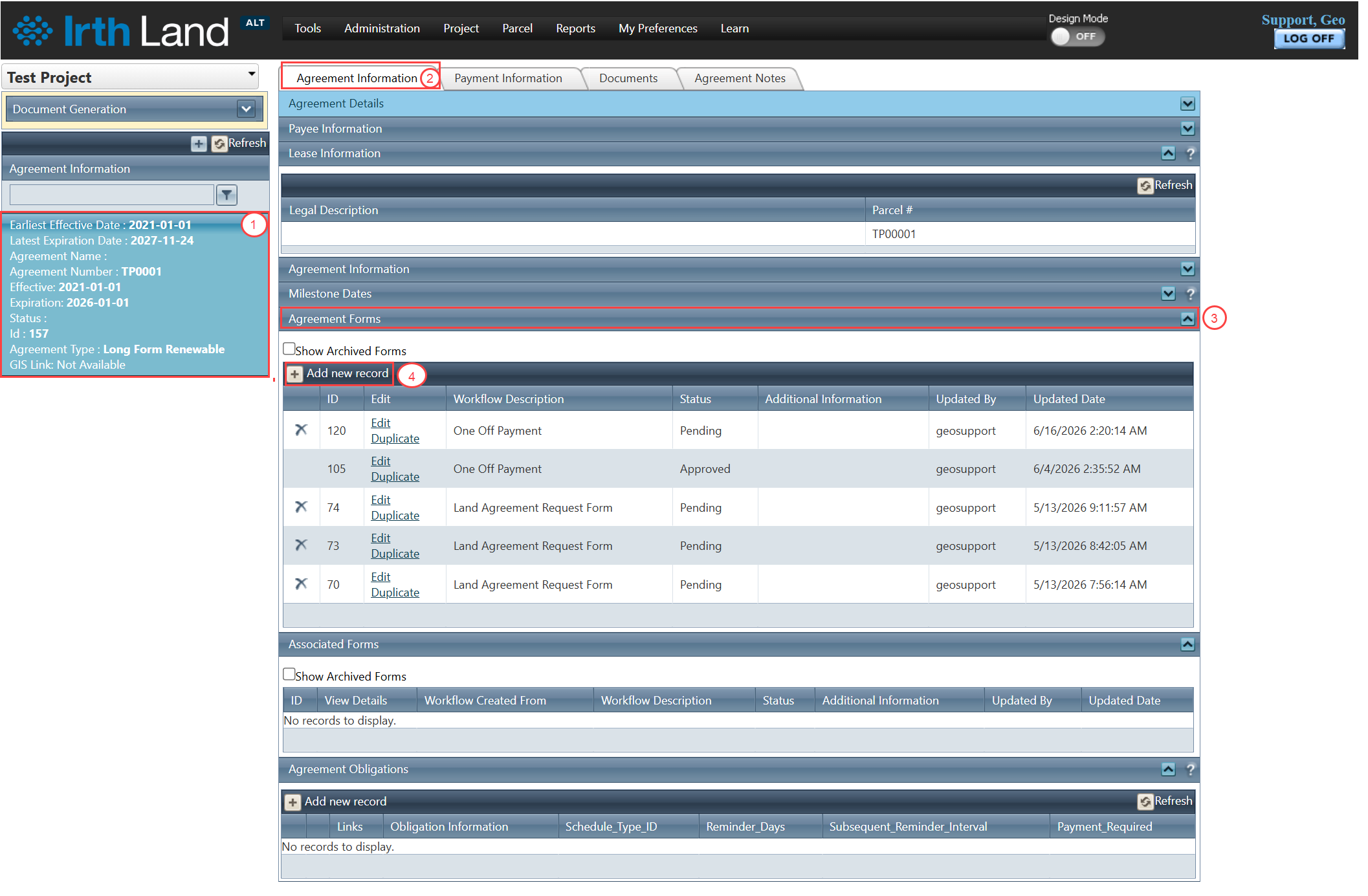
To access this feature: Project > Agreement Manager > Agreement Information Tab > Agreement Forms Panel
Things to Know:
- Only payments that are currently in an Approved status can be voided.
- Voiding a payment does not delete the payment record; it changes the payment status to indicate that the payment is no longer valid.
- Depending on your organization's workflow configuration, users may be required to provide a reason when submitting a void request.
- Users should verify that corresponding updates are made in any connected accounting or financial systems to maintain data consistency.
Key Benefits/Use Cases:
Payment Correction
Void payments that were approved in error while maintaining an accurate record of payment activity.
External Accounting Synchronization
Keep payment records in Irth Land aligned with external accounting or financial systems when payments are canceled outside the application.
Audit and Compliance Tracking
Maintain a complete history of payment actions by updating payment status rather than deleting payment records.
How It Works:
Follow these steps to void an approved payment:
Step 1: Open the agreement associated with the payment.
Step 2: Navigate to the Agreement Information tab.
Step 3: Locate the Agreement Forms panel.
Step 4: Click Add New Record.
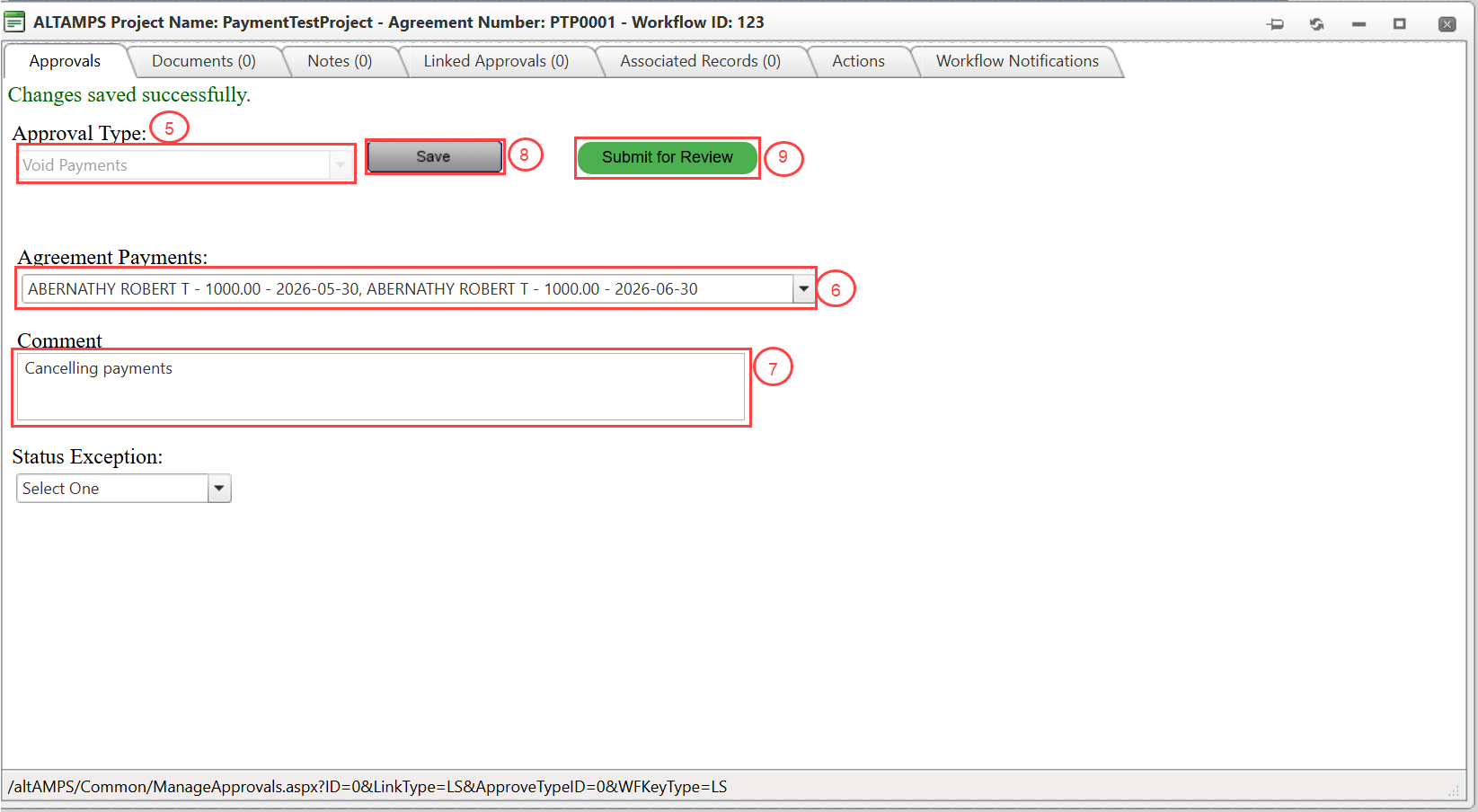
Step 5: From the Approval Type dropdown list, select Void Payment.
Step 6: Select the approved payment that needs to be voided.
Step 7: Provide a reason for voiding the payment, if required by your organization's workflow configuration.
Step 8: Review the information and click Save.
Step 9: Click Submit for Review to route the void request through the approval process.
Step 10: Once approved, the selected payment is marked as voided, and the payment records are updated accordingly.
Related Features/Next Steps:
FAQ/Troubleshooting:
Q: Which payments can be voided?
A: Only payments that are currently in an Approved status can be voided.
Q: Does voiding a payment delete the payment record?
A: No. Voiding a payment does not delete the record. The payment status is updated to indicate that the payment is no longer valid.
Q: Do I need to update external accounting systems after voiding a payment?
A: Yes. If your organization uses connected accounting or financial systems, you should verify that corresponding updates are made to maintain data consistency.
Questions? Contact us!

Was this article helpful?
That’s Great!
Thank you for your feedback
Sorry! We couldn't be helpful
Thank you for your feedback
Feedback sent
We appreciate your effort and will try to fix the article