Purpose/Overview
A Payment Template is used to define how payments are calculated and distributed to payees within the system. Payment templates help standardize payment processing by providing a reusable framework for common payment types, such as leases, royalties, and one-time payments.
This feature reduces manual configuration, ensures consistency across projects, and simplifies payment administration.
Navigation Path:
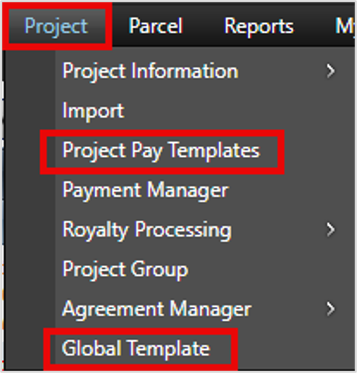
To access this feature: Project > Project Pay Templates or Global Templates
Things to Know:
- The Display Name must be unique to ensure the template can be easily identified.
- The Distribution Method determines how the calculated payment amount is allocated among payees.
- Payment distribution is typically based on ownership percentages defined within the associated agreement.
- Providing a detailed Description is optional but recommended to help users understand the purpose of the template.
Key Benefits/Use Cases:
Standardized Payment Configuration
Create reusable templates for common payment scenarios, reducing repetitive setup tasks and ensuring consistency.
Flexible Payment Processing
Support different payment types such as lease payments, royalty payments, and one-time payments through configurable templates.
Automated Payment Distribution
Use predefined distribution methods to automatically allocate payment amounts among payees based on agreement ownership percentages.
How It Works:
Follow these steps to create a payment template:
Step 1: Navigate to Payment Templates
Navigate to: Project > Project Pay Templates or Global Templates
Step 2: Create a New Template
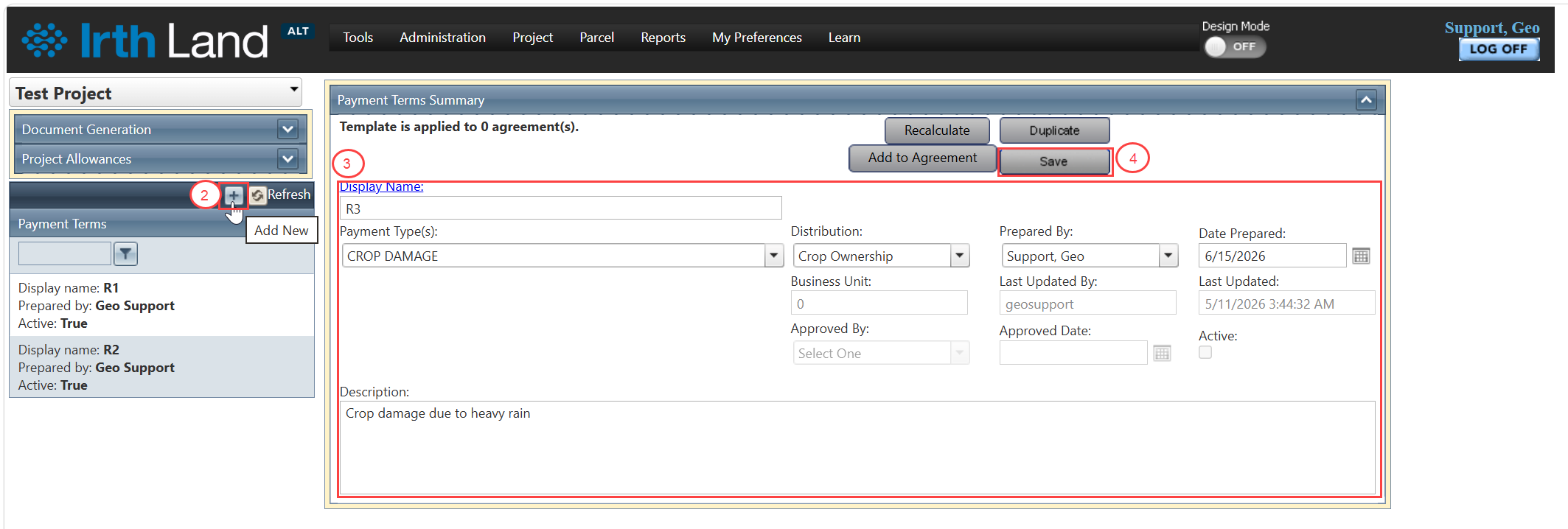
Click Add New Template.
Step 3: Enter Template Details
Complete the required fields:
- Display Name – A unique identifier for the template.
- Type of Payment – Select the applicable payment type (for example, Lease, Royalty, or One-Time).
- Distribution Method – Select how payment amounts will be distributed among payees.
- Description – Optional field used to provide additional details about the template.
Step 4: Save the Template
Click Save to create the payment template.
Related Features/Next Steps:
FAQ/Troubleshooting:
Q: What is the purpose of the Distribution Method?
A: The Distribution Method defines how calculated payment amounts are divided among payees, typically according to ownership percentages specified in the agreement.
Q: Can I create multiple payment templates for different payment types?
A: Yes. Separate templates can be created for different payment types, such as lease, royalty, or one-time payments.
Q: Is the Description field required?
A: No. The Description field is optional, but it is recommended to provide meaningful information about the template's purpose for future reference.
Questions? Contact us!

Was this article helpful?
That’s Great!
Thank you for your feedback
Sorry! We couldn't be helpful
Thank you for your feedback
Feedback sent
We appreciate your effort and will try to fix the article