Purpose/Overview
The Payment Dates configuration defines when payments begin, how frequently they occur, and when they end. These settings are used to automatically generate the complete payment schedule for an agreement.
The feature helps ensure that payment schedules align with agreement terms while reducing manual setup and configuration errors. It is intended for users responsible for creating and maintaining agreement templates that include recurring payment schedules.
Navigation Path:
To access this feature: Project > Project Pay Template or Global Pay Template > Payment Dates panel
Things to Know:
- Payment schedules are generated automatically based on the configured payment date settings and agreement term dates.
- Manual entry of the First Payment Date is no longer supported.
- Users must select from predefined date options to ensure consistency and reduce configuration errors.
- The Last Payment Date is mandatory when recurring payments are enabled.
- Recurring payments are scheduled based on the selected base date, even when an offset is applied to the first payment date.
Key Benefits/Use Cases:
Automated Payment Scheduling
Configure payment start dates, recurring payment frequency, and payment end dates to automatically generate a complete payment schedule.
Flexible First Payment Configuration
Use agreement-based dates such as Effective Date or Expiration Date, with optional day offsets, to accommodate different contractual requirements.
Standardized Recurring Payments
Define recurring payment patterns using monthly, annual, or quarter-based schedules to ensure consistent payment processing.
How It Works:
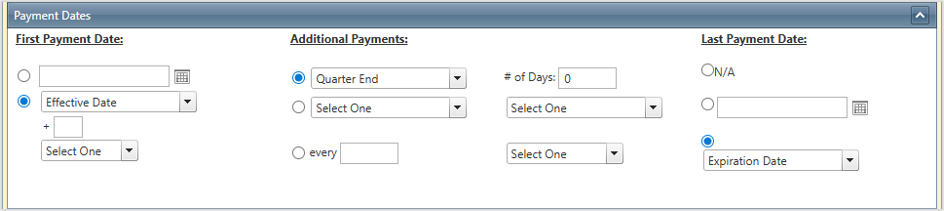
Step 1: Configure the First Payment Date
The First Payment Date determines when the initial payment is triggered.
Users can select either:
- A predefined date option
- A relative date based on agreement term fields
Available relative date options include:
- Effective Date
- Expiration Date
- Alternate First Payment Date
- Effective Date + specified number of days
Note: Manual date entry is not available. Users must select one of the predefined options.
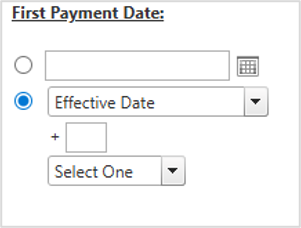
Step 2: Understand Relative Date Behavior
When a relative date with an offset is selected, the system calculates the first payment date as follows:
- Retrieves the selected base date from the agreement term.
- Adds the configured offset (in days) to the base date.
- Uses the resulting date as the first payment due date.
Important: Although the first payment date uses the offset-adjusted date, all recurring payments are scheduled based on the original base date.
This ensures recurring payments remain aligned with the agreement's contractual schedule while providing flexibility for the initial payment.
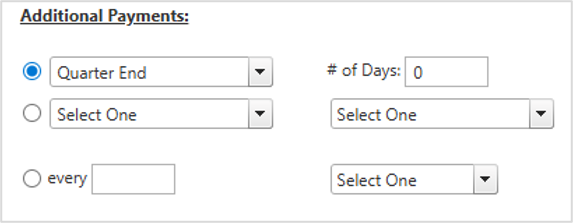
Step 3: Configure Additional Payments
The Additional Payments Panel controls how recurring payments are generated after the first payment.
Available frequency options include:
- Monthly
- Annually
- Quarter Start
Quarter Start Frequency
When Quarter Start is selected:
- Payments are scheduled on the first day of each quarter.
- A configurable offset can be used to shift the payment date forward or backward.
Recurring Payment Date
The Recurring Payment Date option allows users to define a fixed recurring payment date for monthly and annual payment frequencies.
Example: If the recurring payment date is configured as February 14 and the frequency is Annual, payments will be generated on February 14 each year.
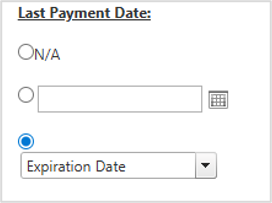
Step 4: Configure the Last Payment Date
The Last Payment Date determines when the system stops generating payments.
Key considerations:
- Required when recurring payments are enabled.
- Typically aligned with the agreement term's expiration date.
- Can be configured independently if business requirements require a different end date.
Related Features/Next Steps:
FAQ/Troubleshooting:
Q: Can I manually enter a First Payment Date?
A: No. Manual date entry has been removed. Users must select from the available predefined date options.
Q: How is the First Payment Date calculated when using a relative date with an offset?
A: The system retrieves the selected agreement date, applies the configured day offset, and uses the resulting date as the first payment date.
Q: Are recurring payments based on the offset-adjusted First Payment Date?
A: No. Recurring payments are generated using the original base date selected from the agreement term, not the offset-adjusted date.
Q: Is the Last Payment Date required?
A: Yes. The Last Payment Date is mandatory when recurring payments are enabled.
Q: What happens when Quarter Start is selected as the payment frequency?
A: Payments are generated on the first day of each quarter. An offset can be configured to adjust the payment date forward or backward.
Questions? Contact us!

Was this article helpful?
That’s Great!
Thank you for your feedback
Sorry! We couldn't be helpful
Thank you for your feedback
Feedback sent
We appreciate your effort and will try to fix the article