Purpose/Overview
The CPI-Based Escalation Configuration feature allows users to define how payments within an agreement term are adjusted based on Consumer Price Index (CPI) values. Users can configure minimum (floor) and maximum (cap) limits to ensure that escalation calculations remain within contractual boundaries.
This feature is designed for financial administrators and contract managers who need to ensure accurate, automated, and compliant escalation calculations.
Navigation Path:
To access this feature: Project > Agreement Manager > Agreement Information Tab > Agreement Details Panel > Agreement Term Window (CPI Configuration Section)
Things to Know:
- CPI Min and Max values are optional but must satisfy Min ≤ Max validation.
- Multiple CPI indices can be configured per term.
- Duplicate CPI index entries within the same term are not allowed.
- CPI values support up to 8 decimal places for precision.
- Min/Max limits apply only when a valid CPI value exists.
Key Benefits/Use Cases:
- Controlled Payment Escalation: Ensure CPI-based increases do not fall below or exceed contractual limits.
- Flexible Index Configuration: Configure multiple CPI indices per term with independent limits.
- Automated Financial Accuracy: Reduce manual intervention by automating escalation calculations.
How It Works:
Follow these steps to configure CPI escalation:
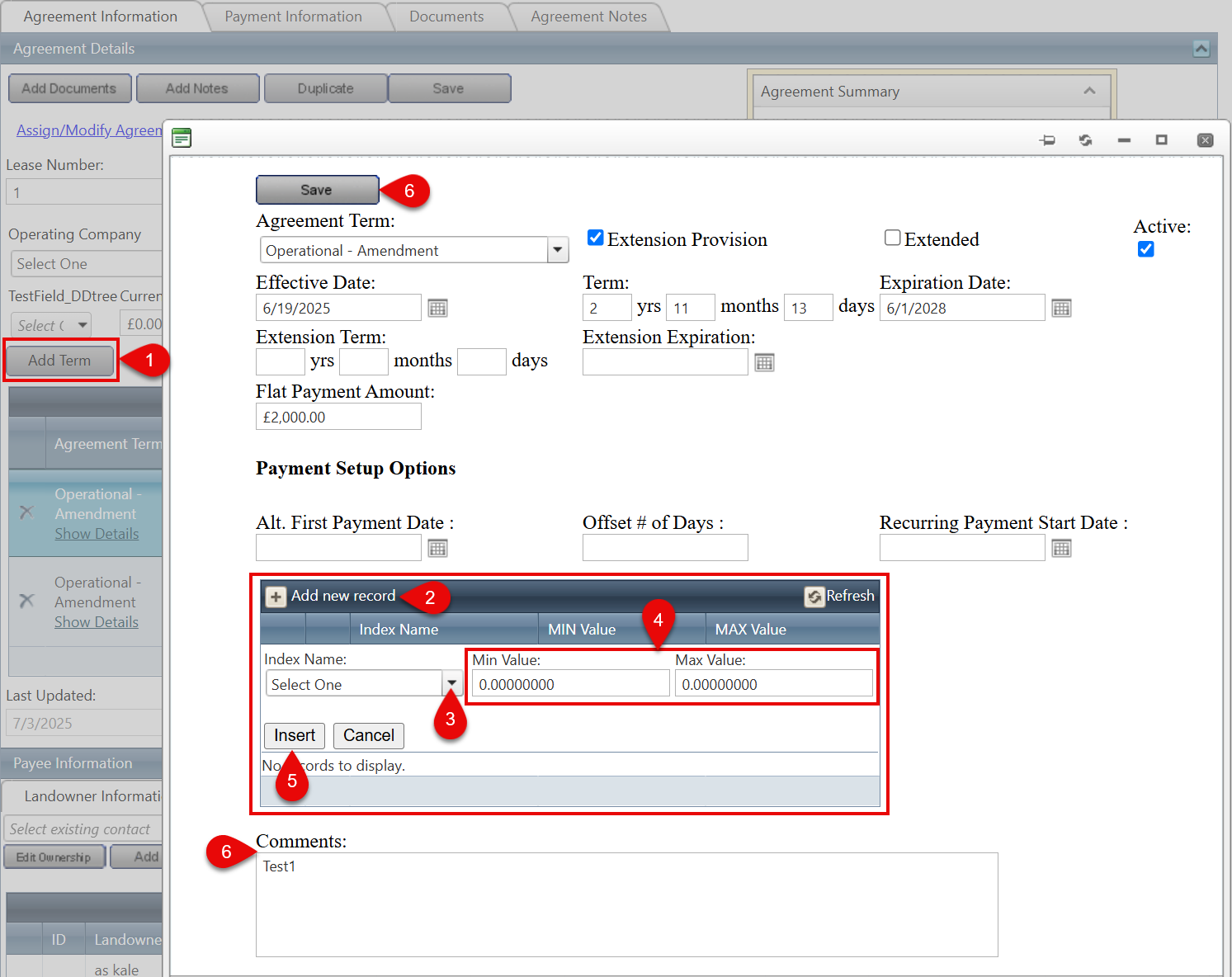
Step 1: Open the Agreement Term window and navigate to the CPI Configuration section.
Step 2: Click Add New Record.
Step 3: Select an Index Name (e.g., CPI-U).
Step 4: Enter:
- Min Value (minimum CPI adjustment %)
- Max Value (maximum CPI adjustment %)
Step 5: Click Insert to save the CPI configuration.
Step 6: (Optional) Add Comments and click Save to finalize.
CPI Calculation Logic:
During payment calculation:
- If CPI < Min Value → Min Value is applied
- If CPI > Max Value → Max Value is applied
- If CPI is within range → Actual CPI is applied
Example:
- CPI = 0.96% → Applied: 1.20% (Min)
- CPI = 1.96% → Applied: 1.96% (Actual)
- CPI > 5.00% → Applied: 5.00% (Max)
Related Features/Next Steps:
FAQ/Troubleshooting:
Q: Why can’t I add the same CPI index twice?
A: The system prevents duplicate CPI index entries within the same term to maintain data integrity.
Q: Why is validation failing when entering Min and Max values?
A: Ensure that the Min Value is less than or equal to the Max Value.
Q: Why are Min/Max limits not applied during calculation?
A: Min/Max limits are only applied when a valid CPI value exists. If CPI is zero or unavailable, they are ignored.
Questions? Contact us!

Was this article helpful?
That’s Great!
Thank you for your feedback
Sorry! We couldn't be helpful
Thank you for your feedback
Feedback sent
We appreciate your effort and will try to fix the article