Purpose/Overview
The Adding Landowners to Agreement feature in Agreement Manager allows users to associate one or more landowners (payees) with an agreement and define their ownership details.
This feature ensures that all eligible payees are correctly linked to an agreement for payment processing, ownership allocation, and documentation tracking. It is primarily used by project managers, land teams, and administrative users responsible for managing agreements and distributing payments.
By enabling both individual landowner addition and ownership allocation, this feature helps maintain accurate financial distribution and legal ownership records.
Navigation Path:
To access this feature: Project > Agreement Manager > Agreement Information Tab > Landowners and Parcel/Payee Information Panel > Landowner Information Tab
Things to Know:
- The Contact Type field appears directly within the Landowner Information tab.
- Ownership allocation can be configured at both landowner level and parcel level.
- The system supports adding both existing contacts and new landowners.
- Documents related to a landowner can be attached via the Associated Documents panel.
- The system uses configurable precision settings:
- AcresPrecision: Default 5 decimal places
- OwnershipPrecision: Default 8 decimal places
- The label Ownership Share reflects the display name configured in the payment share custom field.
- Key Setting:
ParceladdInheritsownershipfromAgmntallows newly added parcels to inherit ownership from the agreement.
Key Benefits/Use Cases:
- Managing Multiple Payees: Add multiple landowners to a single agreement to ensure all stakeholders receive appropriate payments.
- Accurate Ownership Allocation: Define ownership percentages between landowners or parcels to ensure correct payment distribution.
- Centralized Landowner Management: Maintain all landowner details, documents, and ownership information in one place for easy access and updates.
How It Works:
Follow these steps to add landowners:
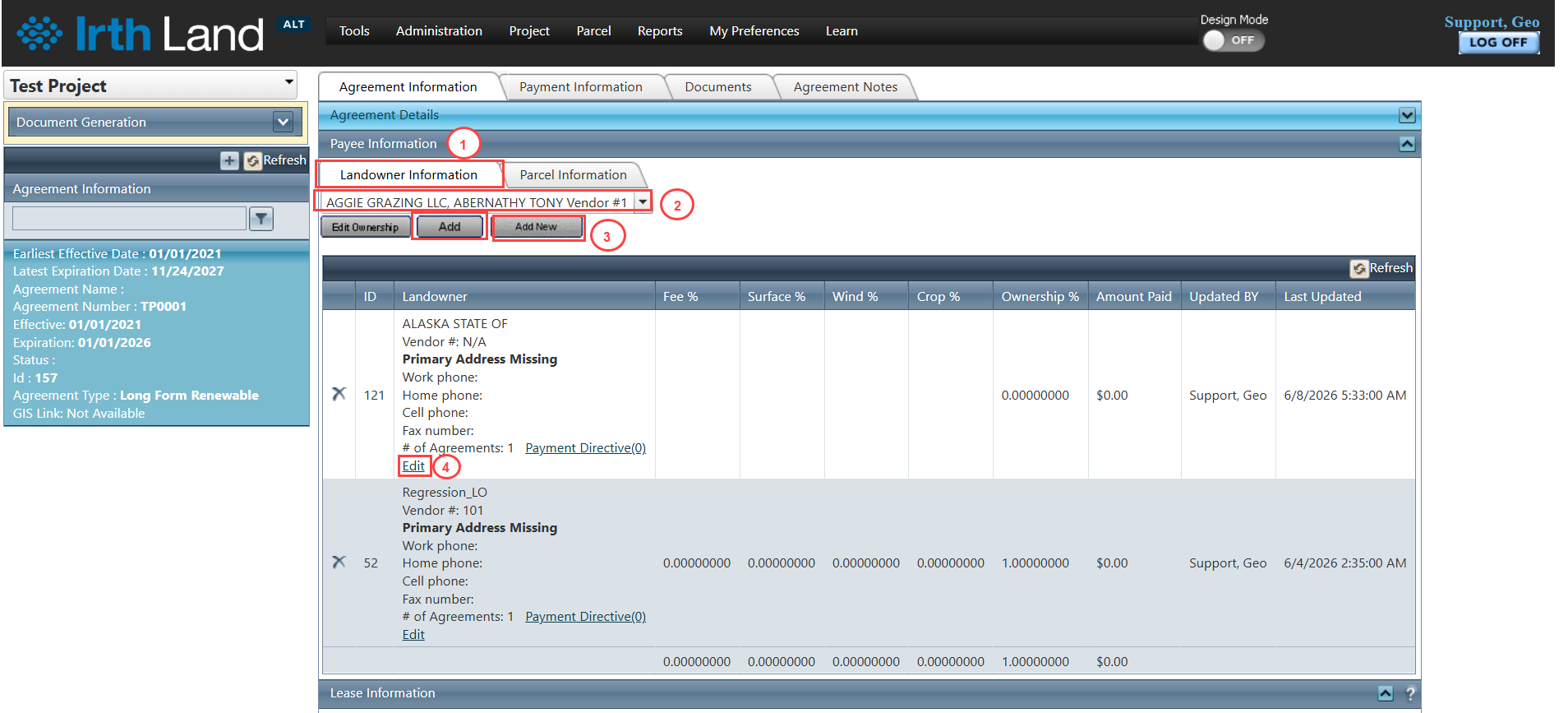
Step 1: Navigate to: Project > Agreement Manager > Agreement Information Tab > Landowners and Parcel/Payee Information Panel > Landowner Information Tab
Step 2: Use the multi-select combo dropdown to select an existing contact and click Add.
Step 3: To create a new landowner, click the Add New button and enter the required details.
Step 4: To update an existing landowner, click the Edit link corresponding to the record.
Adding/Managing Landowner Documents
Step 1: Navigate to the Landowner Information tab.
Step 2: Click the Edit button below the landowner details.
Step 3: Use the Associated Documents panel to upload or manage documents related to the landowner.
Setting Landowner Ownership of Agreement
Follow these steps to define ownership:
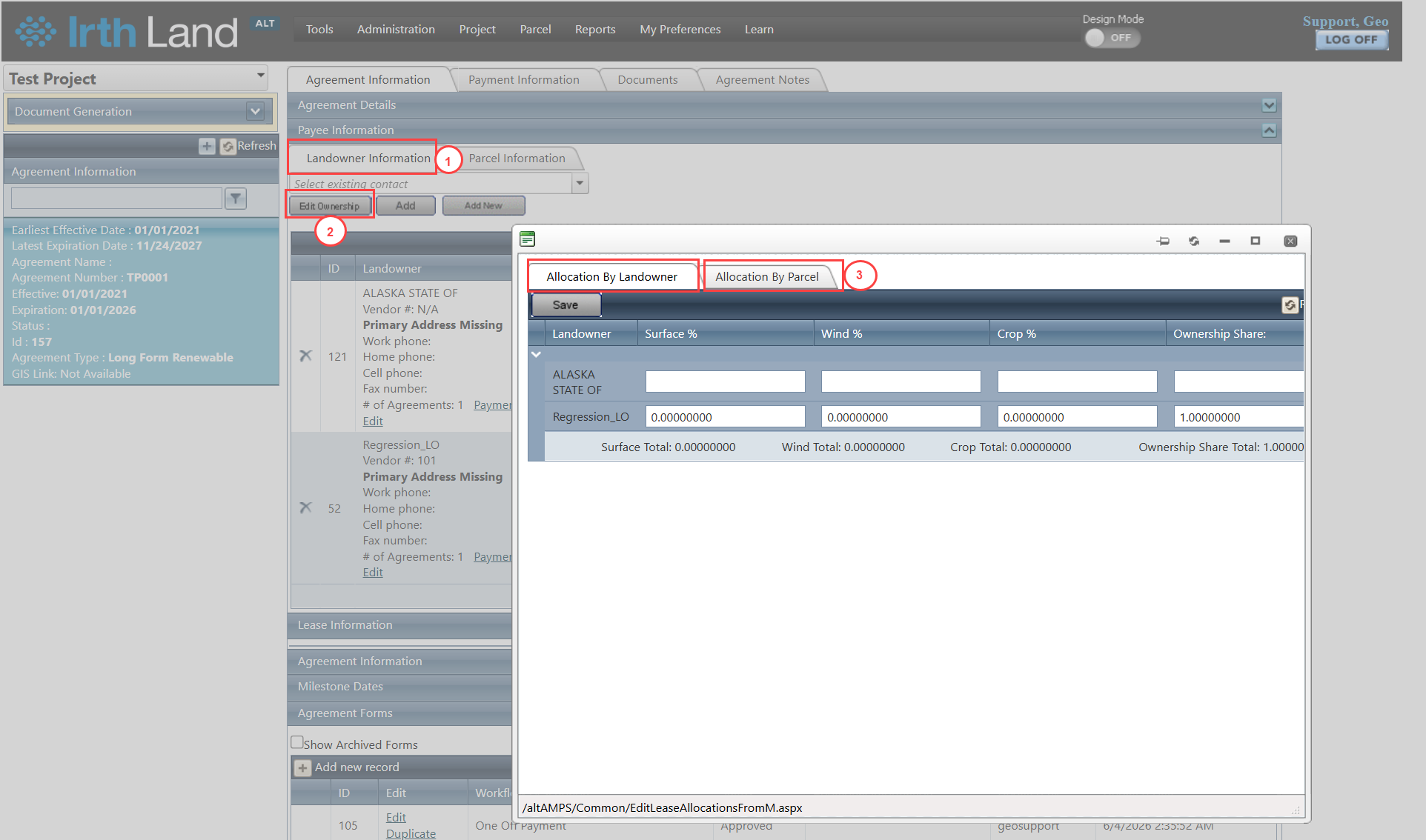
Step 1: Navigate to the Landowner Information tab.
Step 2: Click the Edit Ownership button.
Step 3: Choose one of the following allocation methods:
- Allocation by Landowner Tab – Set ownership percentage across landowners
- Allocation by Parcel Tab – Set ownership percentage based on parcels
Related Features/Next Steps:
FAQ/Troubleshooting:
Q: Can I add multiple landowners at once?
A: Yes, you can use the multi-select dropdown to add multiple existing contacts.
Q: How do I update landowner ownership percentages?
A: Use the Edit Ownership button and configure values in either the Allocation by Landowner or Allocation by Parcel tab.
Q: Why are ownership values showing many decimal places?
A: This is due to system precision settings (OwnershipPrecision defaults to 8 decimal places).
Questions? Contact us!

Was this article helpful?
That’s Great!
Thank you for your feedback
Sorry! We couldn't be helpful
Thank you for your feedback
Feedback sent
We appreciate your effort and will try to fix the article