Purpose/Overview
Single Sign-On (SSO) enables users to securely access the application using a single set of login credentials across multiple systems. Instead of managing separate usernames and passwords, users authenticate once through a centralized identity provider and gain seamless access to connected services.
This feature is particularly useful for organizations that want to improve security, reduce password fatigue, and streamline user access management. It eliminates the need to remember multiple credentials while ensuring consistent authentication policies across systems.
Navigation Path:
To access this feature: Login Page > SSO Login Link
Things to Know:
- Users must be configured in the organization’s identity provider (IdP) to access the system via SSO.
- SSO authentication is handled through a SAML-based login page.
- Users will be redirected to the organization’s authentication page before gaining access.
- If SSO is enabled, standard login credentials may be restricted or disabled depending on configuration.
- Browser compatibility may vary depending on the identity provider settings.
Key Benefits/Use Cases:
- Centralized Access Management: Users can log in once and access multiple integrated applications without repeated authentication, improving efficiency and user experience.
- Enhanced Security: Authentication is managed through a secure identity provider, ensuring consistent enforcement of security policies such as multi-factor authentication (MFA).
- Reduced Credential Management Overhead: Eliminates the need for users to maintain multiple passwords, reducing helpdesk requests related to password resets.
How It Works:
Follow these steps to log in using SSO:
- Step 1: Click the SSO Login option.
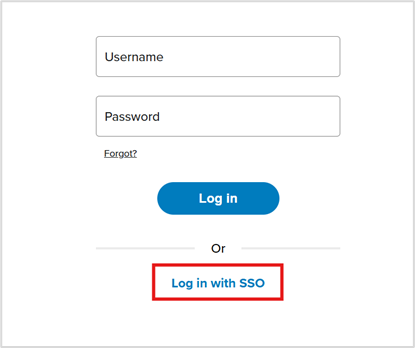
- Step 2: You will be redirected to your organization’s login page.
- Step 3: Enter your corporate credentials.
- Step 4: After authentication, you will be redirected to Irth Land.
Related Features/Next Steps:
FAQ/Troubleshooting:
Q: What should I do if I cannot access the SSO login page?
A: Ensure you are using the correct SSO link provided by your organization. Contact your administrator if the issue persists.
Q: Why am I being redirected repeatedly during login?
A: This may be due to session or browser cookie issues. Try clearing your browser cache or using a different browser.
Q: Can I use my regular username and password instead of SSO?
A: This depends on your organization’s configuration. In many cases, SSO-only access is enforced for security reasons.
Questions? Contact us!

Was this article helpful?
That’s Great!
Thank you for your feedback
Sorry! We couldn't be helpful
Thank you for your feedback
Feedback sent
We appreciate your effort and will try to fix the article