INTRODUCTION
Knowing the risk associated with excavation jobs is paramount for successful damage prevention. DigTix provides the ability to easily identify risk and allocate the appropriate resources to address risk.
DigTix considers millions of data points to provide a single risk score for people and projects. The higher the risk score, the greater the risk associated to that individual or project. It is possible to configure custom risk scoring factors to further support your organization's damage prevention plan.
NOTE: In our upcoming releases, we will be introducing many new and improved capabilities focused on risk management. Check back regularly for the latest improvements and information!
WHAT CONTRIBUTES TO RISK?
Risk can be considered as a combination of two quantifiable factors, as shown in the risk matrix (Figure 1) below:
1) The probability of an adverse event occurring aka “likelihood”.
2) The consequence if an adverse event does occur aka “impact”.
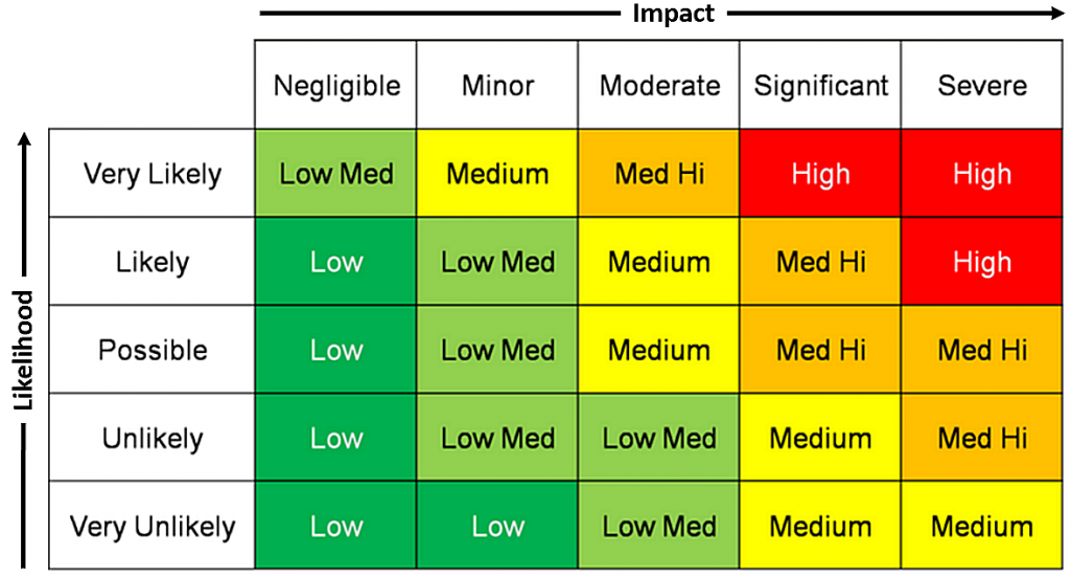
Figure 1: Risk Matrix
CONSEQUENCE / IMPACT
The consequence of an adverse events is usually specific to your organization. Worst-case scenarios can be reasonably approximated based on things which are (or can be) known:
- Asset footprint
- Infrastructure types
- Gas vs fiber
- Material
- Size
- Service lines vs transmission mains
- Customer footprint
- Urban vs rural
- Hospitals, schools, 911 centers, other points of interest
Maintaining quality geospatial information is a key risk mitigation factor. Knowing where your assets, customers, and points of interest are located will allow your organization to accurately quantify consequence for any adverse event that may occur.
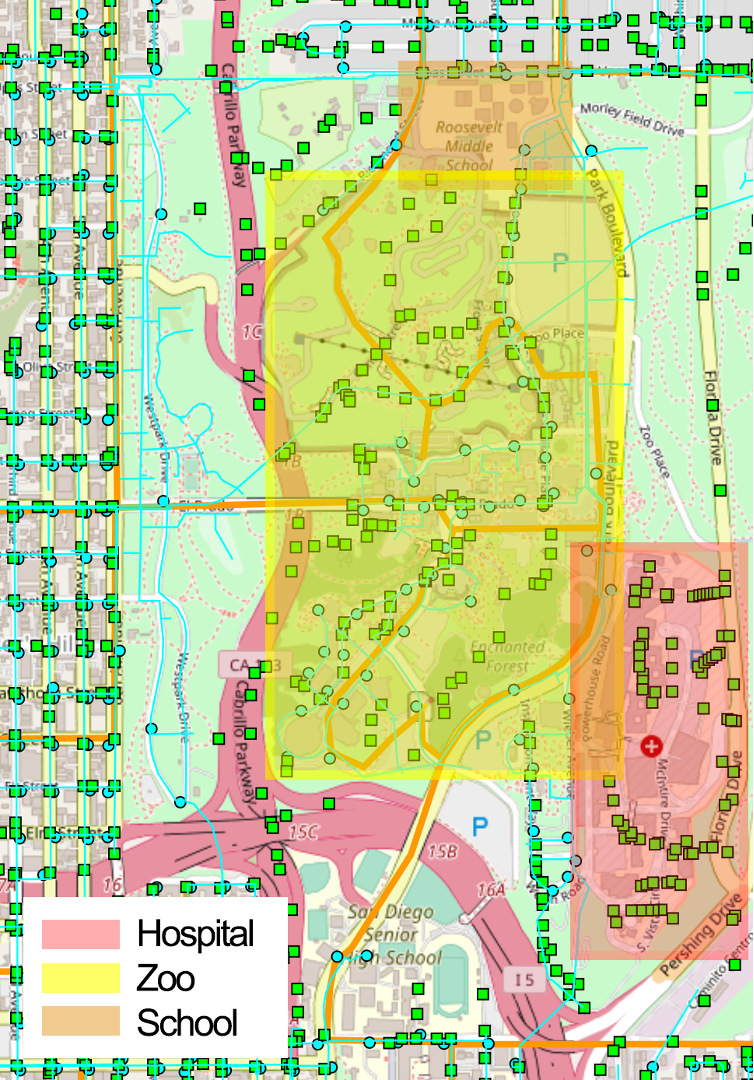
Figure 2: Identification of Customer Footprint and Points of Interest
QUANTIFYING CONSEQUENCE VIA GEOSPATIAL DATA
Underground assets and customer service areas may be designated as "Critical" through the "Infrastructure Types" section of the Administration page.
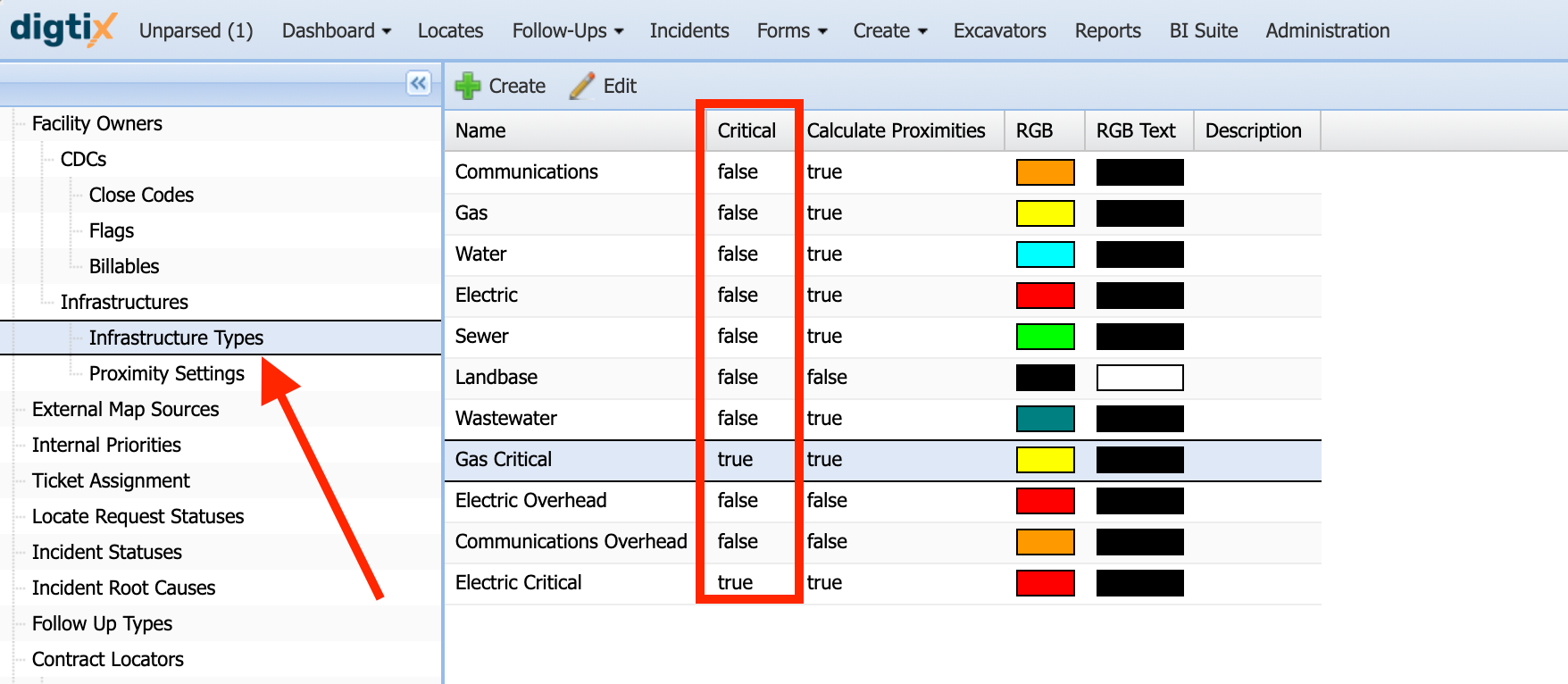
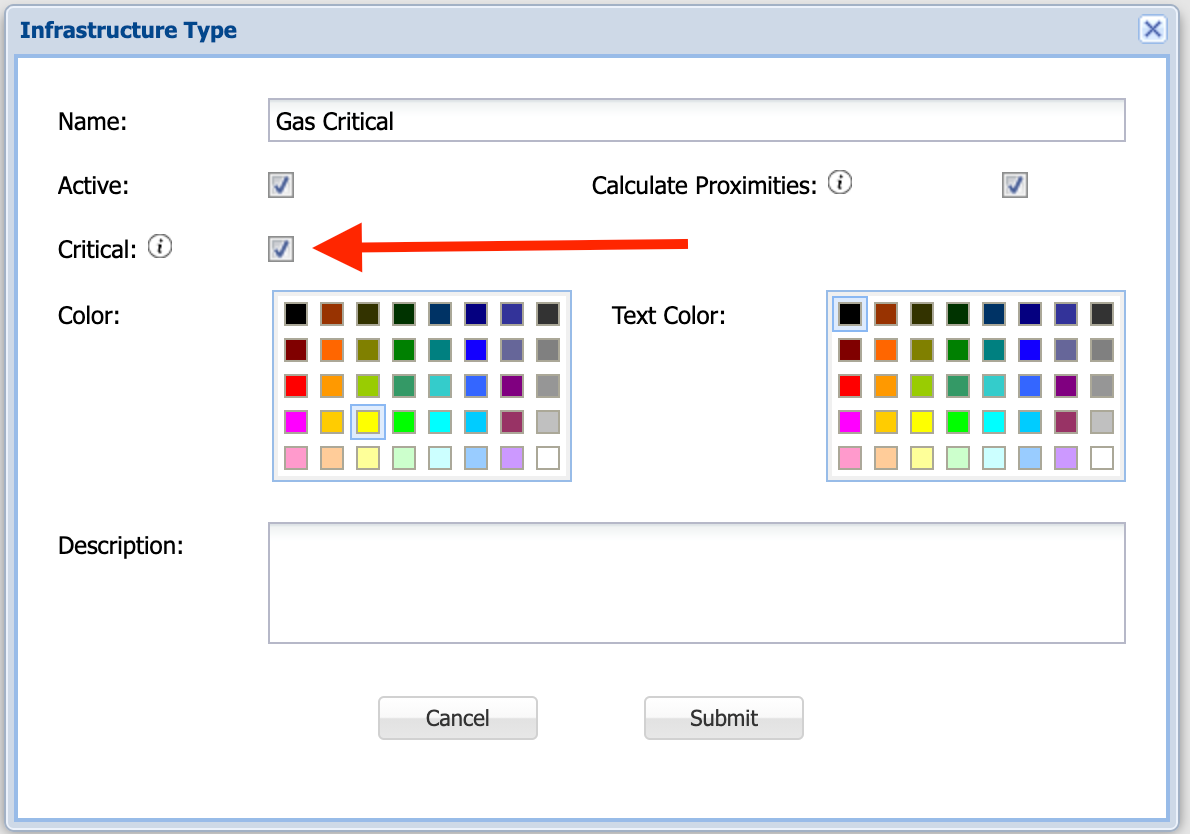
Figure 3: Critical vs Non-Critical Assets and Service Areas
Loading geospatial information into DigTix and designating areas as critical allows DigTix to determine if critical assets or service areas are in the scope of a locate request. This allows DigTix users to accurately quantify consequence for excavations.
IMPROVING GEOSPATIAL DATA QUALITY
Utility locators have the opportunity to provide field feedback on the GIS data loaded into DigTix. This can be done by creating a map note at the location where data quality could be improved. This map note can be sent to an internal team for consideration. Upon review, the GIS data may be corrected to provide a higher level of data quality, thereby improving your organization's ability to quantify risk probability and consequence factors.
Map notes may be created by "long clicking" the map at the location you wish to add a note. For more information, see the "Map Notes" section of the Introduction to the Ticket Map knowledge base article.
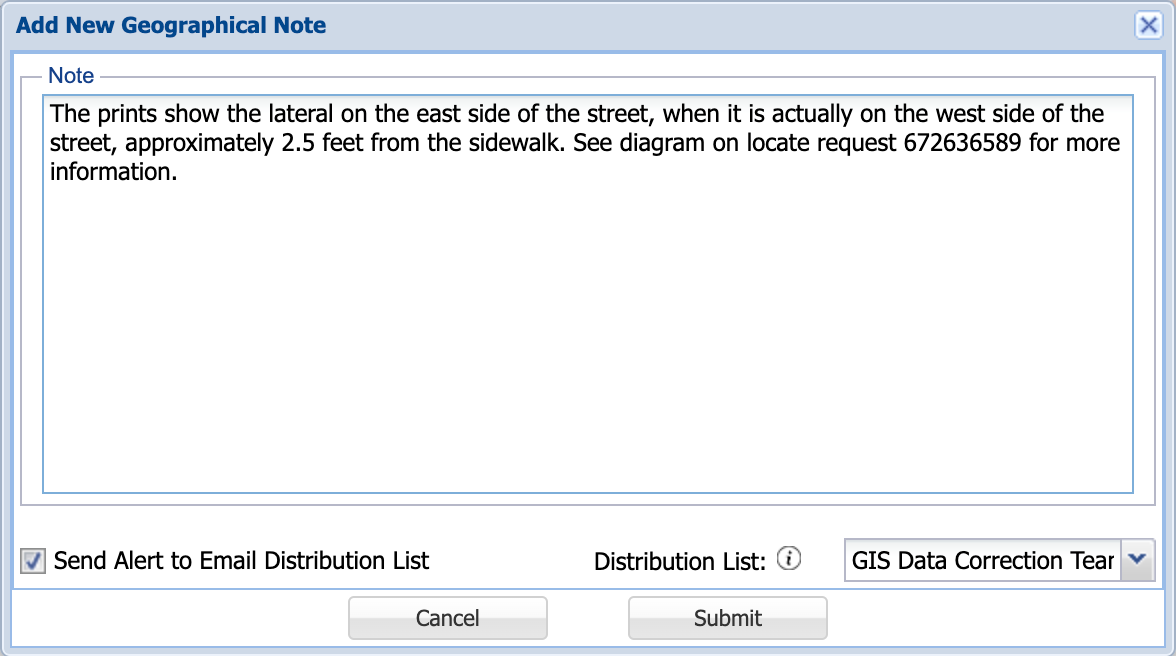
Figure 4: Notifying GIS Data Department of Low Quality Data
MANAGING HIGH CONSEQUENCE AREAS ("HCA")
Designating infrastructures as critical provides DigTix the ability to determine if critical assets are in the scope of a locate request. This allows DigTix users to efficiently identify and prioritize high-impact locate requests.
As with all locate request fields, the new "Critical Infrastructure Close" field can be filtered, sorted, hidden, saved within views, and exported to Excel directly from the locate request grid.
The "Critical Infrastructure Close" field is considered within the DigTix Risk Score model.
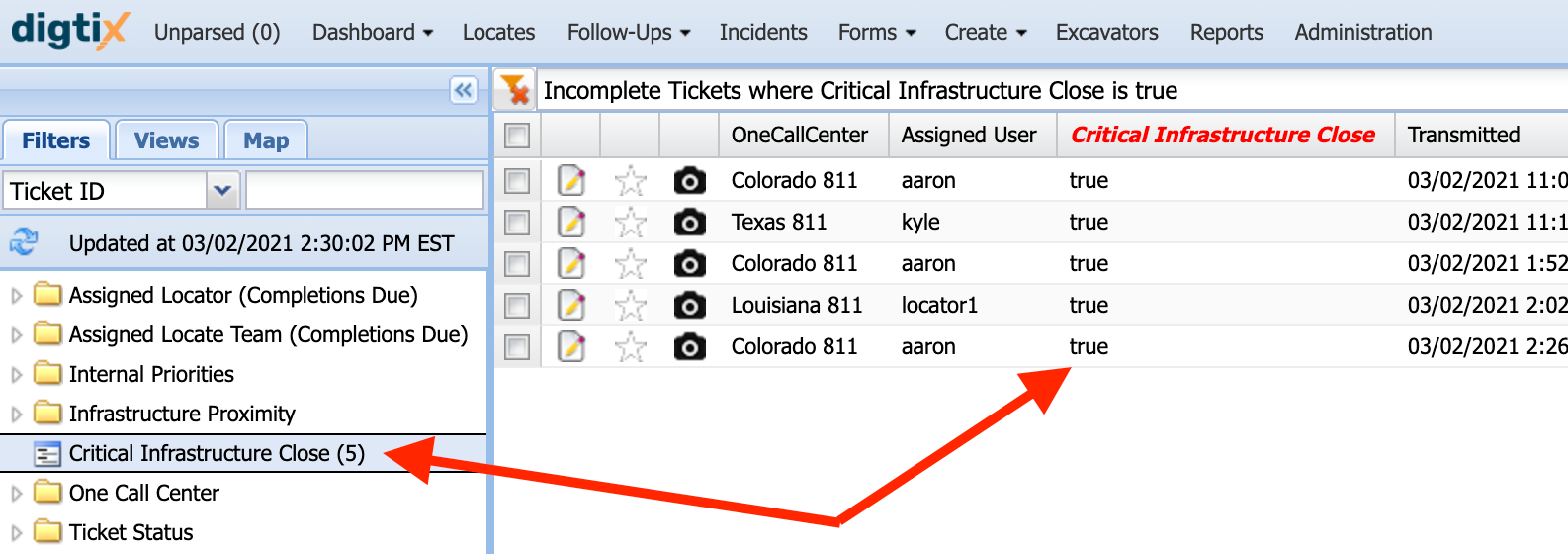
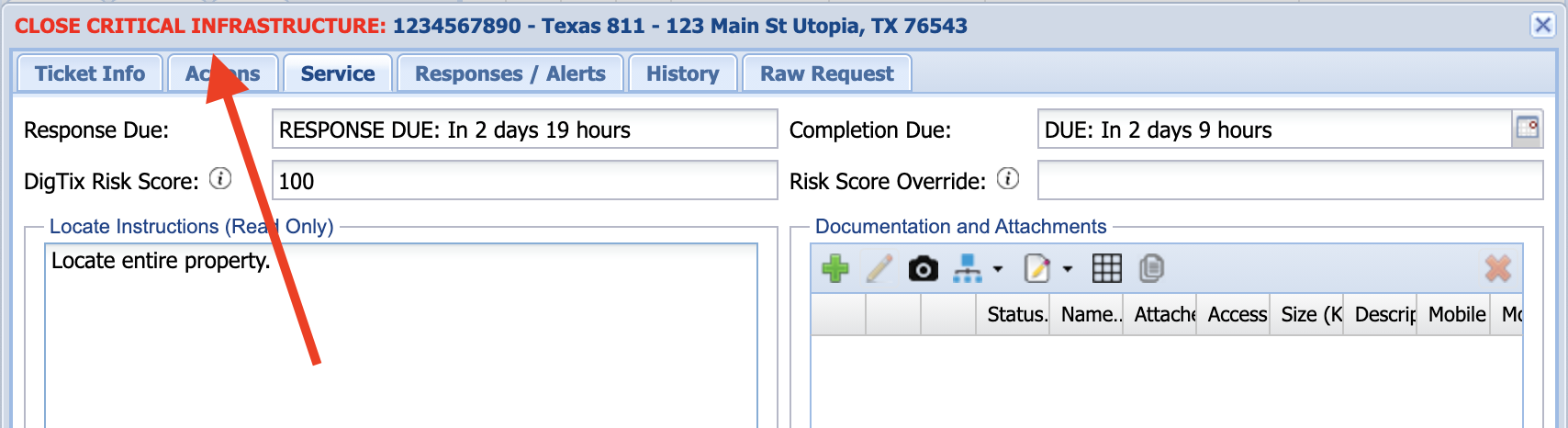
Figure 5: Filtering and Viewing Critical Infrastructure Locate Requests
The new "Critical Infrastructure Close" field may also be used as a condition when defining assignment rules. In this way, all locate requests involving a critical asset can be assigned to a user (with an optional alert) for careful review before dispatching to the field.
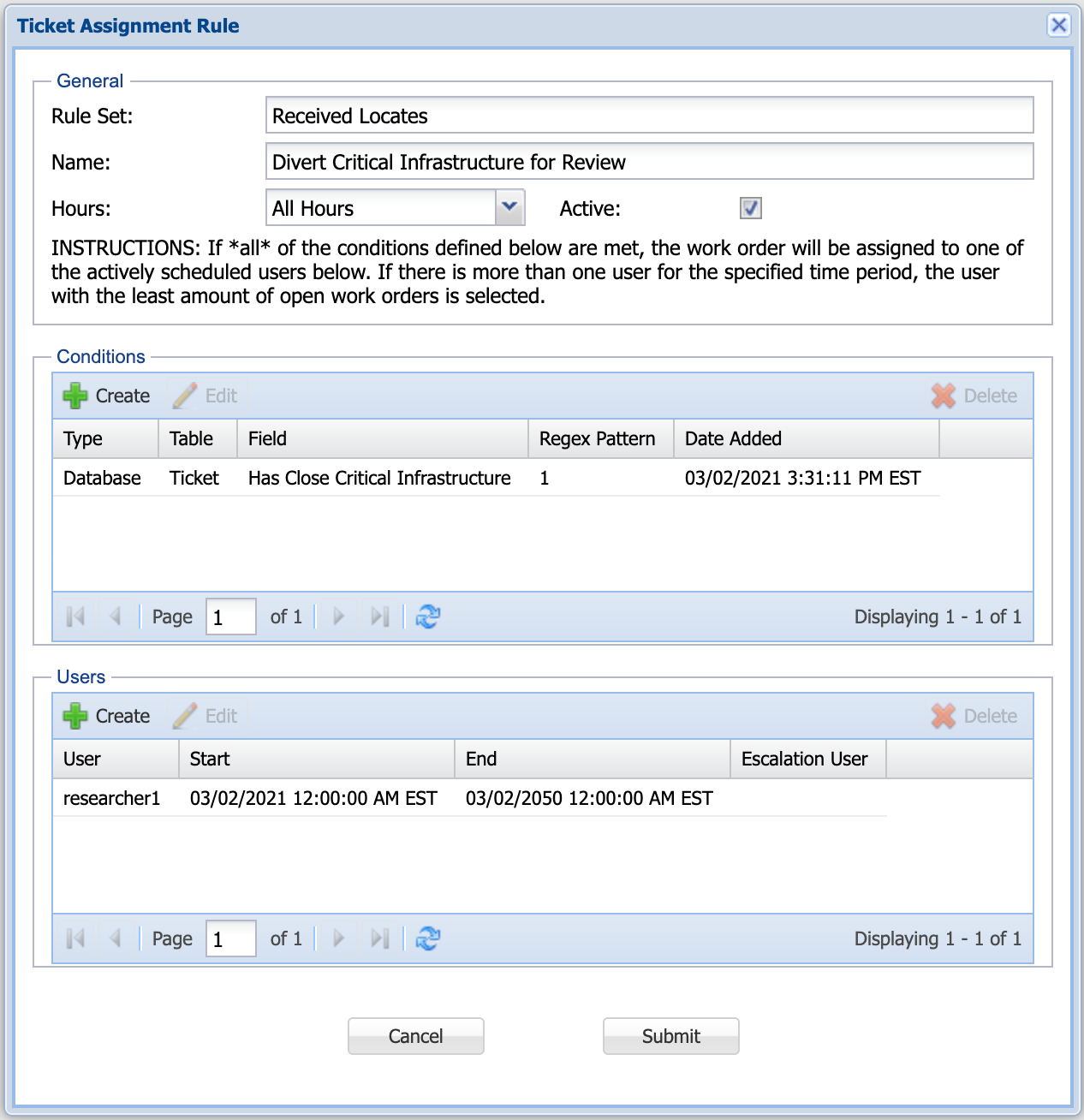
Figure 6: Assigning Locate Requests Based on Critical Infrastructure
AUTOMATED FOLLOW UP TRIGGERS FOR HCA
It is possible to automatically trigger follow ups based on infrastructure criticality / proximity. Such triggers can be configured from the "Triggers" tab on the "Follow Up Types" section of the DigTix Administration page. Follow ups which are automatically triggered can also be automatically assigned to the appropriate damage prevention specialist via the "Ticket Assignment" section of the DigTix Administration page.
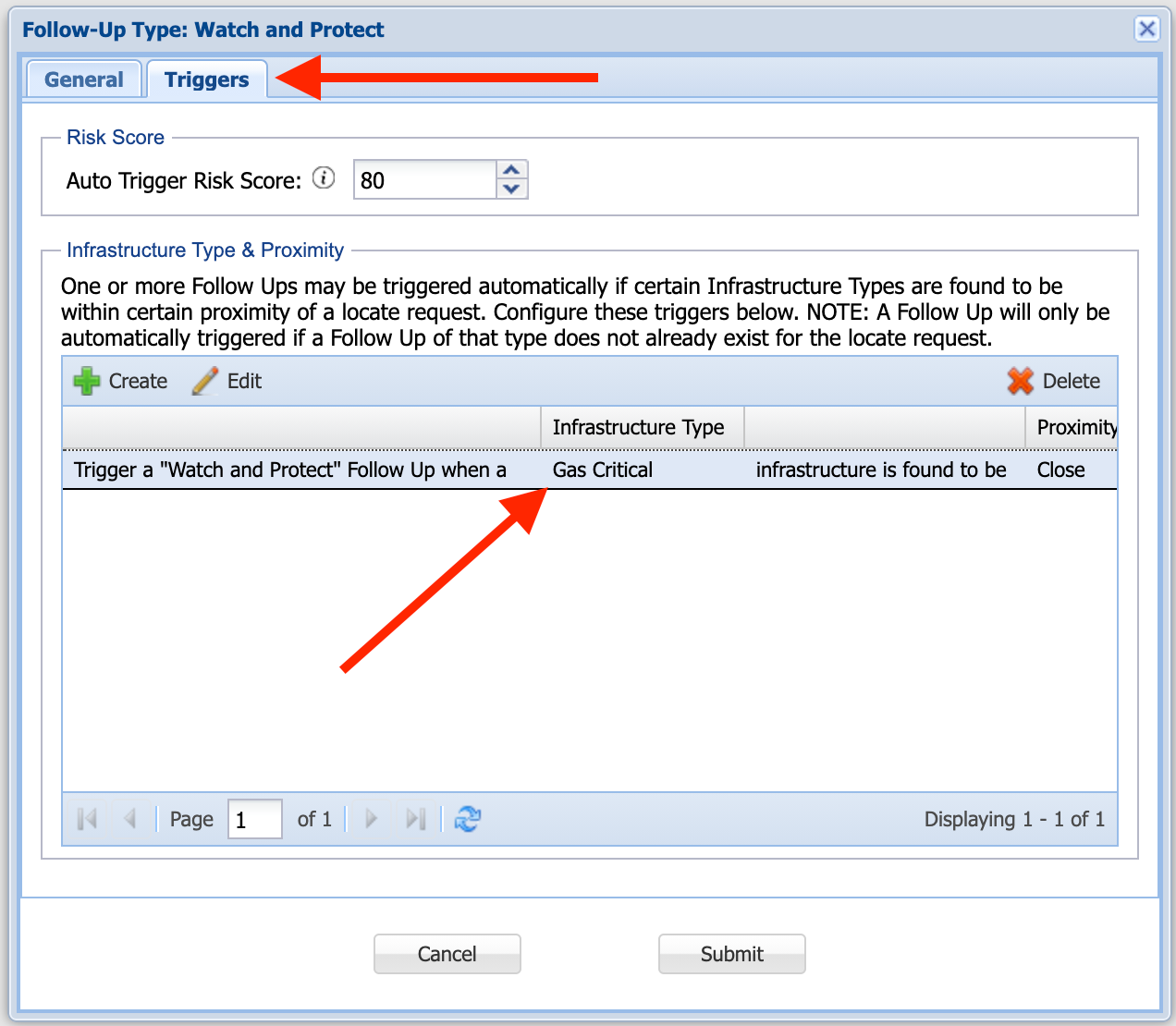
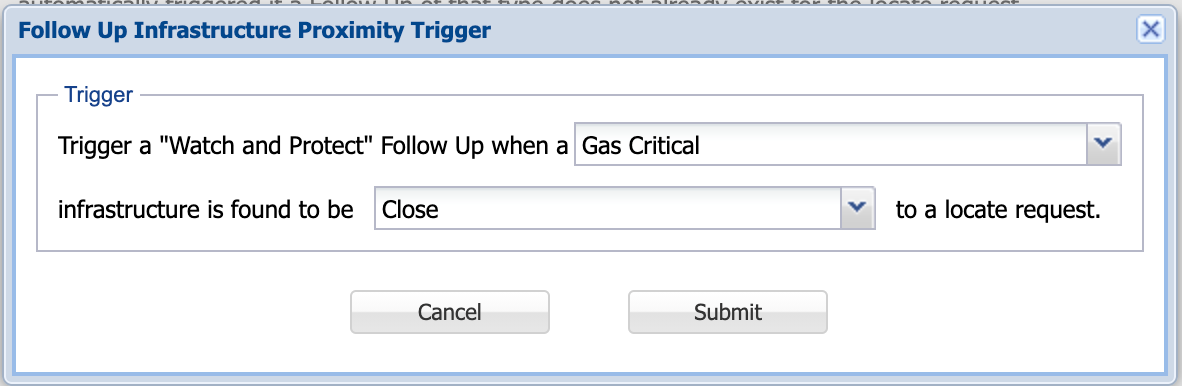
Figure 7: Configuring Automatic Follow Up Triggers
EXCAVATOR RISK
The "Excavators" page within DigTix provides a searchable registry of all excavators who have submitted a locate request or been involved in an incident. DigTix automatically calculates and maintains a risk score for every excavator based on past performance.
The model that DigTix uses to calculate the risk score for each excavator is proprietary. Excavator risk scores range from 0 (low) to 100 (critical). Risk scores may be further increased or decreased by implementing risk scoring factors specific to your DigTix environment. If your organization would like to explore custom risk scoring factors, please get in touch with the DigTix support team.
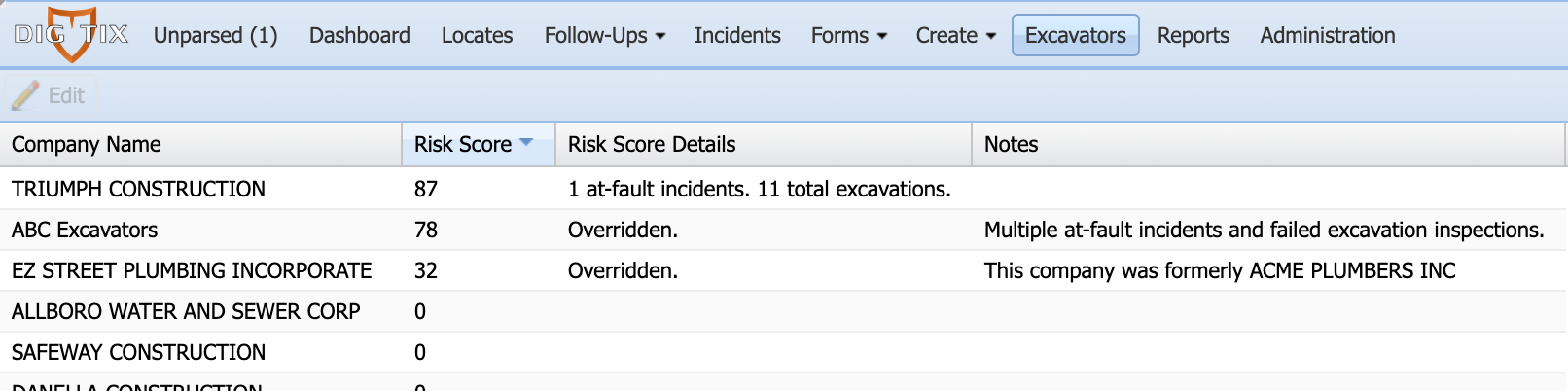
Figure 8: Excavator Registry Page
The excavator risk score may be manually overridden by providing a value in the "Risk Score Override" field for that excavator.
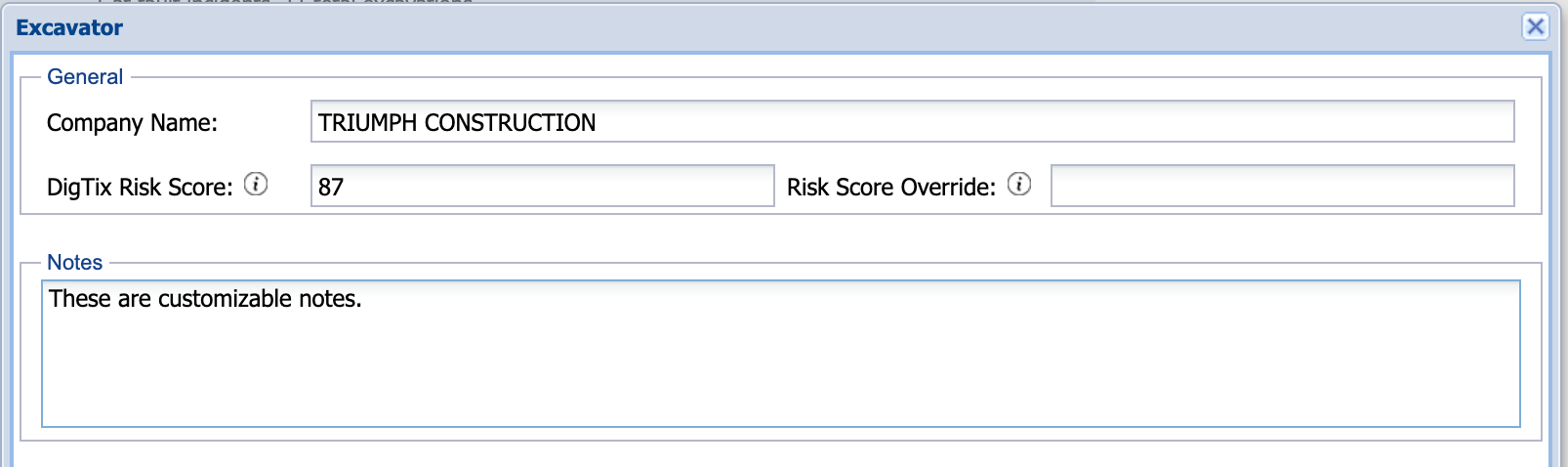
Figure 9: Excavator Risk Score Override
Excavator risk scores is one of the many factors used in determining the risk for locate requests.
LOCATOR (USER) RISK
DigTix automatically calculates and maintains a risk score for every defined user based on past performance.
The model that DigTix uses to calculate the risk score for each user is proprietary. User risk scores range from 0 (low) to 100 (critical). Risk scores may be further increased or decreased by implementing risk scoring factors specific to your DigTix environment. If your organization would like to explore custom risk scoring factors, please get in touch with the DigTix support team.

Figure 10: User Risk Management
The user's risk score may be manually overridden by providing a value in the "Risk Score Override" field for that user.
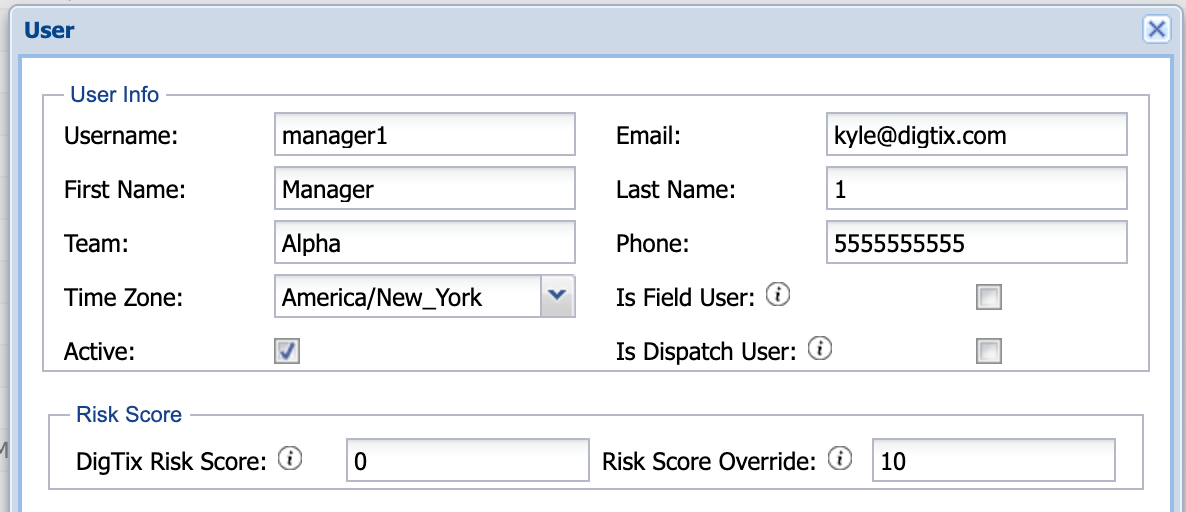
Figure 11: User Risk Score Override
User risk scores is one of the many factors used in determining the risk for locate requests.
CONTRACT LOCATOR RISK
DigTix automatically calculates and maintains a risk score for every third party contract locator which submits a positive response via the DigTix positive response service.
The model that DigTix uses to calculate the risk score for each contract locator is proprietary. Risk scores range from 0 (low) to 100 (critical). Risk scores may be further increased or decreased by implementing risk scoring factors specific to your DigTix environment. If your organization would like to explore custom risk scoring factors, please get in touch with the DigTix support team.
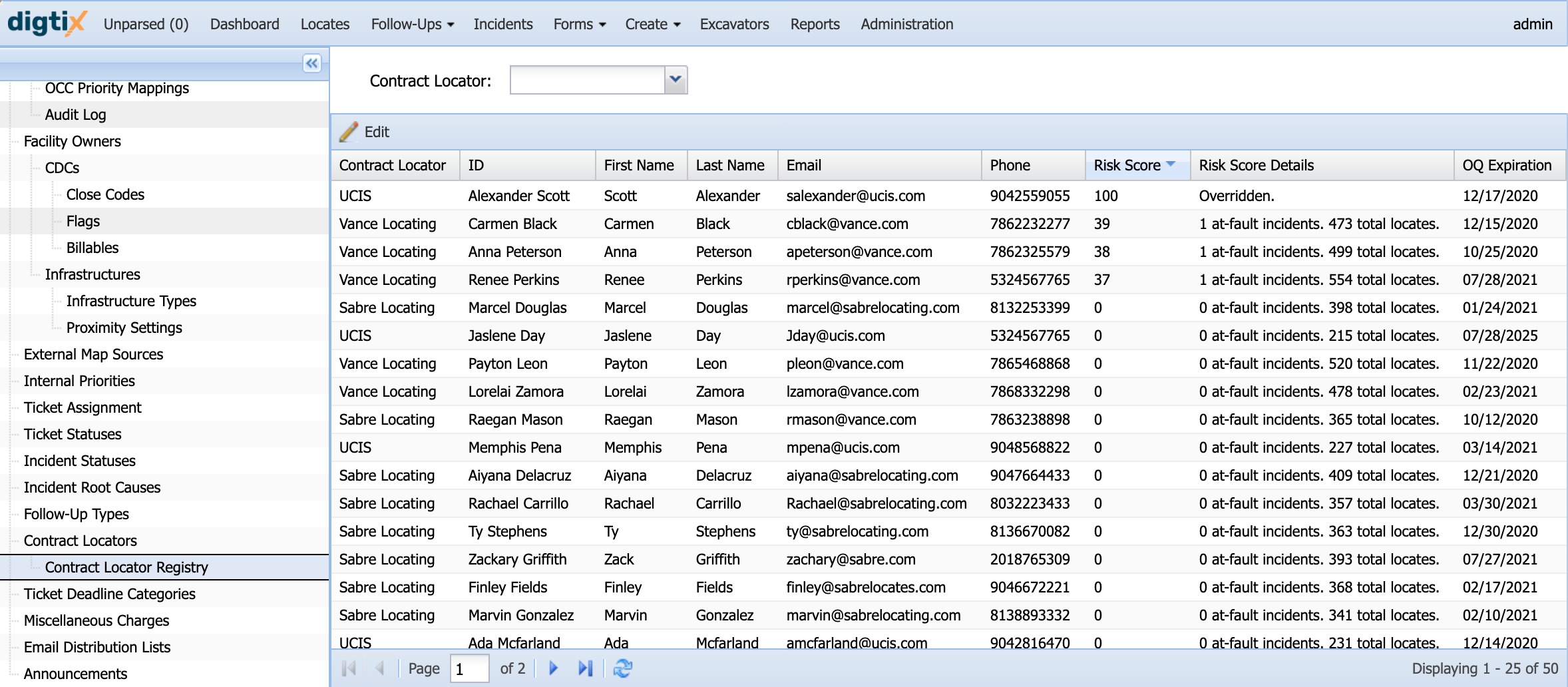
Figure 12: Contract Locator Risk Management
The contract locator's risk score may be manually overridden by providing a value in the "Risk Score Override" field for that contract locator.
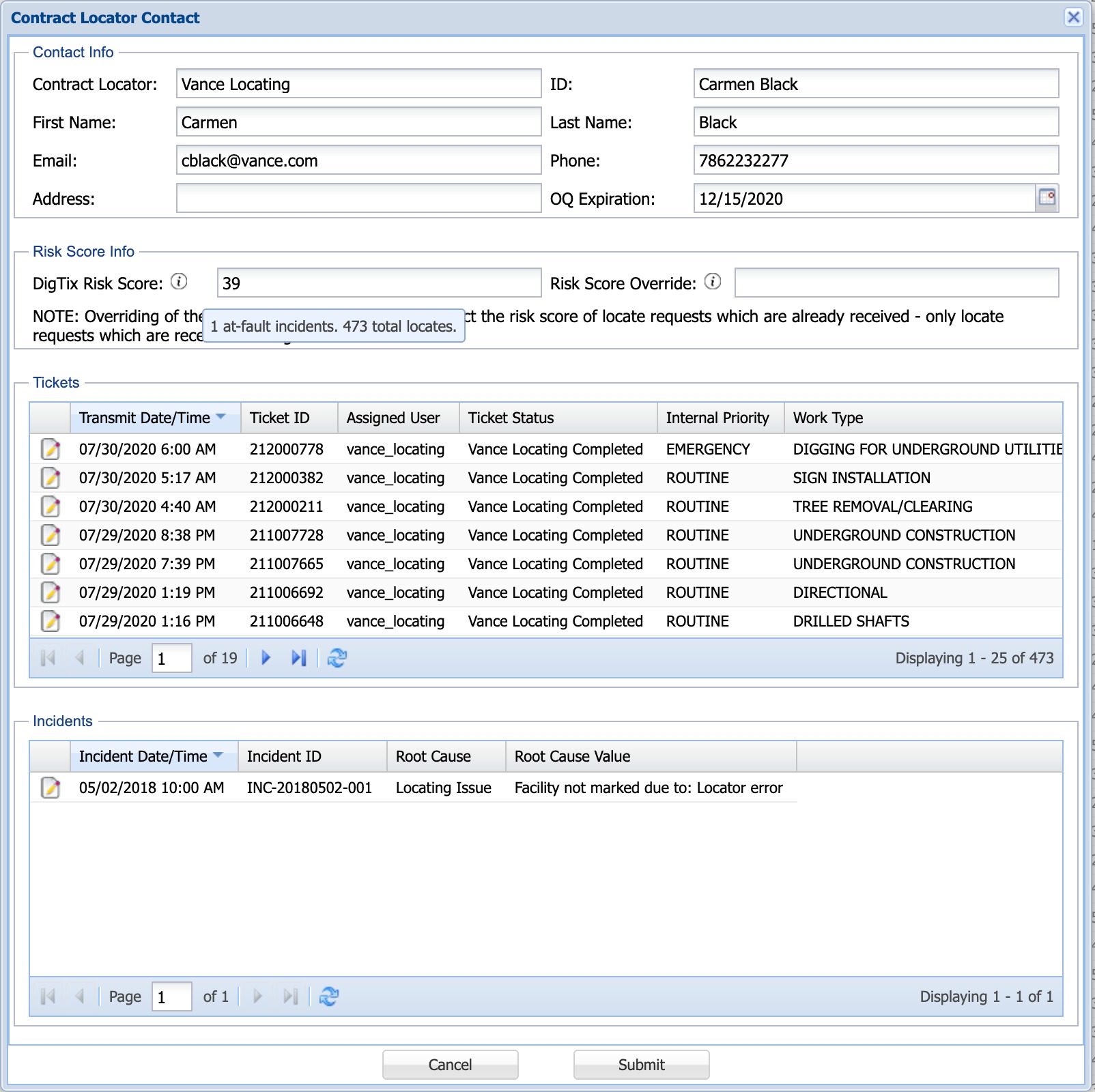
Figure 13: Contract Locator Risk Score Override
Contract locator risk scores is one of the many factors used in determining the risk for locate requests.
LOCATE REQUEST RISK
DigTix automatically calculates and maintains a risk score for every locate request using intelligent predictive models. The models that DigTix uses to calculate the risk score for each locate request is proprietary, however the factors detailed above (excavator, locator, etc) are among those considered. Locate risk scores range from 0 (low) to 100 (critical). Risk scores may be further increased or decreased by implementing risk scoring factors specific to your DigTix environment. See the "Customized Risk Score Modifiers" section below for more information.
Locate request risk scores are displayed in the locate grid's "Risk Score" column. Similar to other columns, the "Risk Score" column can be filtered, sorted, hidden, or moved to create the desired data visualization.
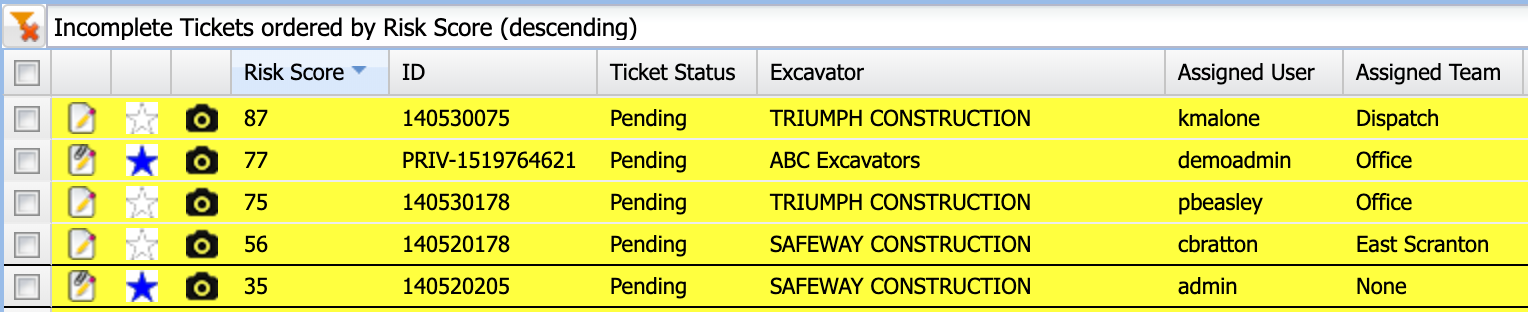
Figure 14: Viewing the Highest Risk Locate Requests
Locate request risk scores may be thematically mapped by selecting "Risk" in the "Color By" drop down. This will color each locate request in the grid and on the map by the risk associated to each job.
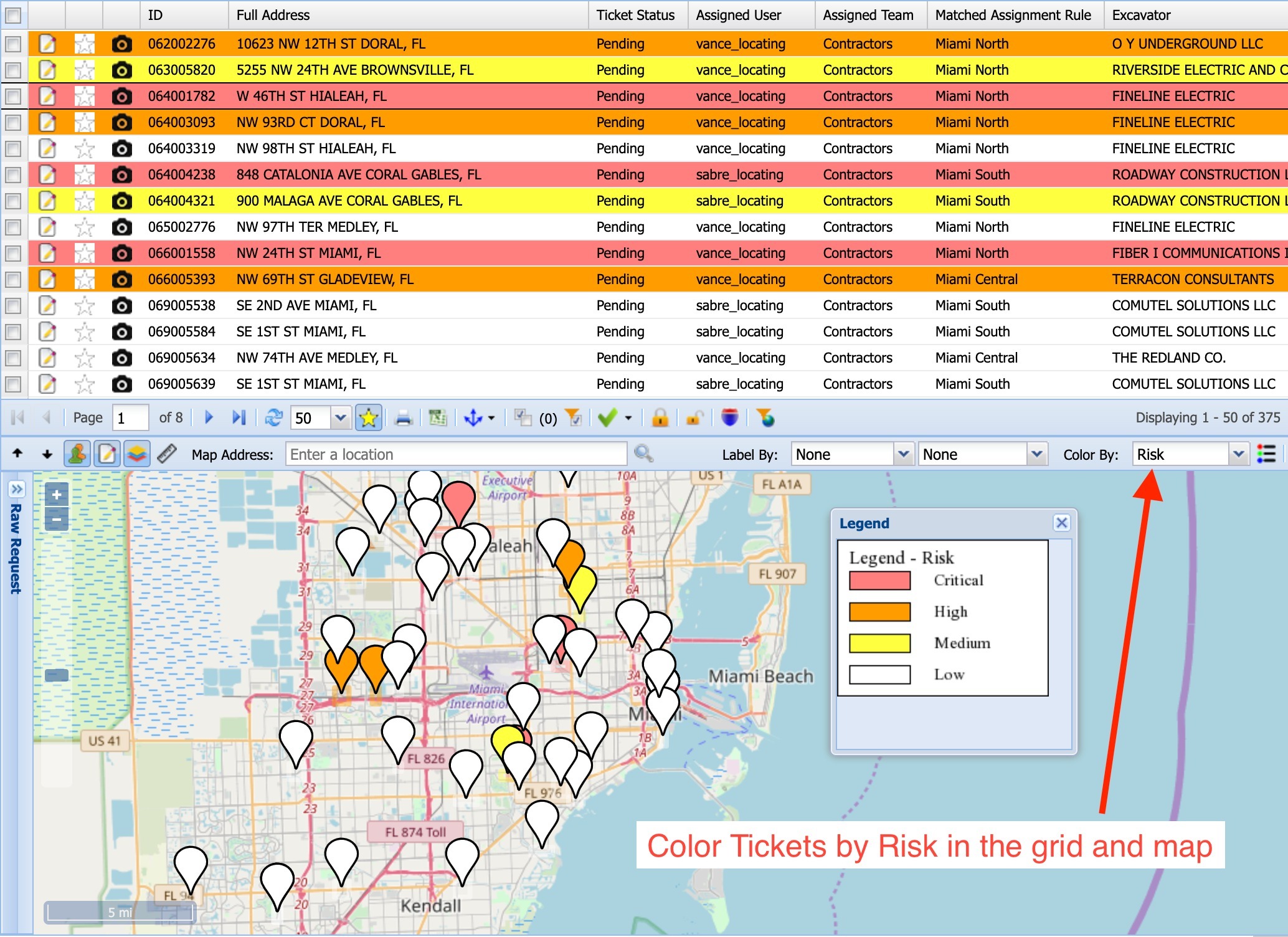
Figure 15: Coloring Tickets by Risk
Risk scores may be overridden on a case by case basis in the "Risk Score Override" field if extraordinary circumstances are identified.

Figure 16: Locate Request Risk Score Override
Organizations should flag high risk locates for extra attention. For example, triggering a follow up in the form of a utility locate audit, excavation inspection, watch & protect, etc. could prevent an incident from occurring during excavation.
MIGRATING HISTORICAL RISK DATA INTO DIGTIX
If your organization tracked at-fault damage rates in another system prior to using DigTix, you may import that data into DigTix quickly and easily. Excavators, in-house locators, and third-party locators may have their locate and at-fault incident counts configured into their DigTix profiles. DigTix will then consider their pre-DigTix performance when calculating and maintaining their risk scores.
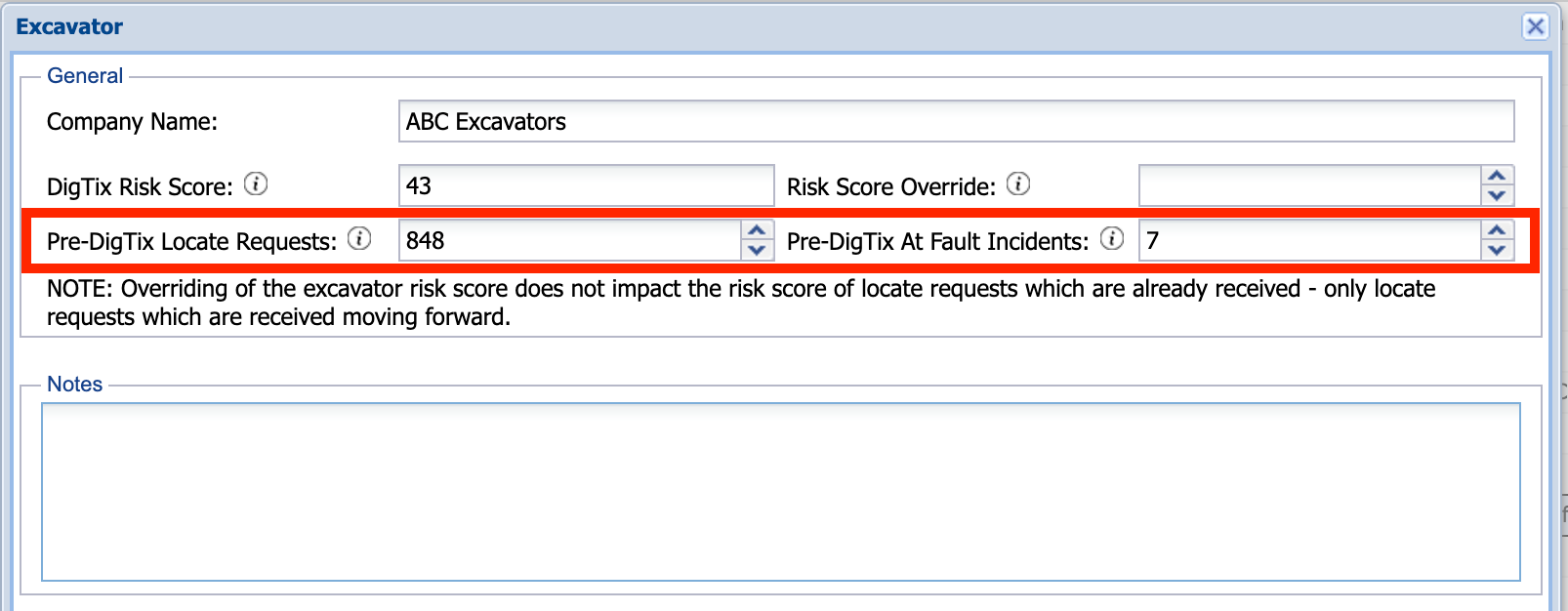
Figure 17: Importing Excavator Performance Data Prior to Using DigTix
CUSTOMIZED RISK SCORE MODIFIERS
Adjustments to the DigTix risk scoring algorithm may be configured at any time via the "Risk Score Modifiers" section of DigTix's Administration page. These modifiers provides a powerful way to prioritize work based on trends observed in the field or special initiatives adopted by your organization. Some examples of risk score modifiers are included in Figure 18 below.
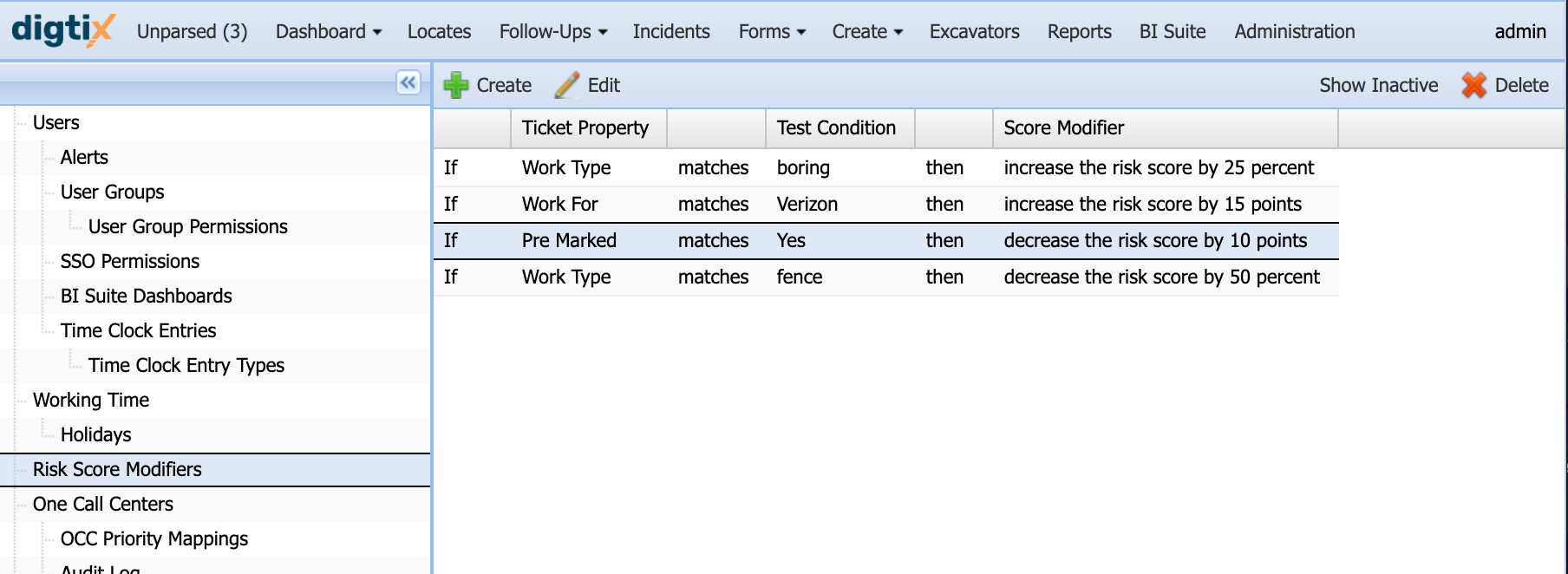
Figure 18: "Risk Score Modifiers" Section of the DigTix Administration Page
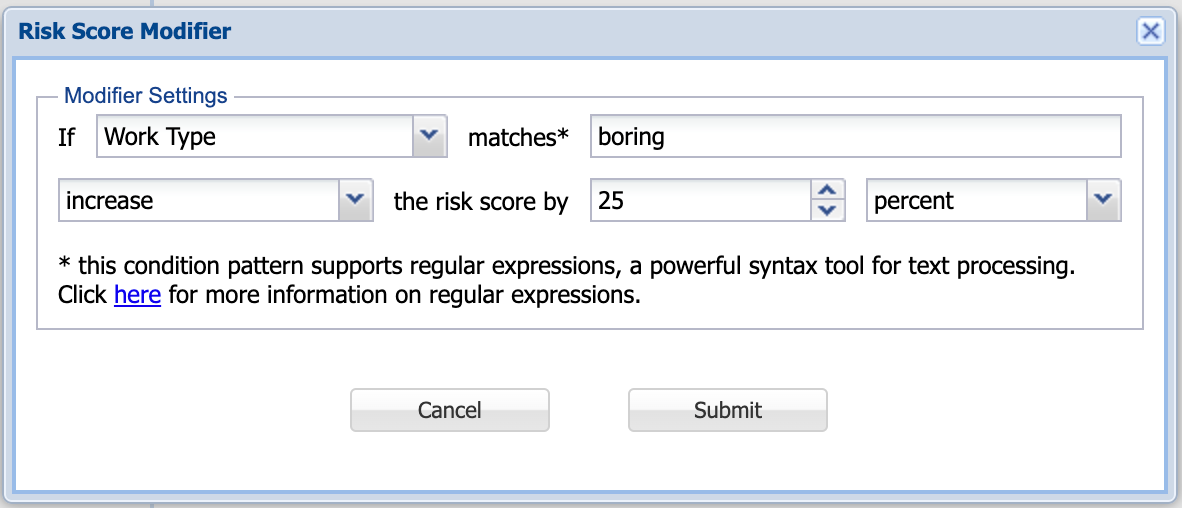
Figure 19: Example of "Risk Score Modifier" Configuration
Any part of the locate request may be inspected in order to increase or decrease the risk score by a specified amount. The amount may be absolute (e.g. "Increase by X points") or relative to the original DigTix risk score (e.g. "Decrease by 10%").
DIGSIGHTS: AI FOR INCIDENT PREDICTION
DigSights is a set of machine learning ("ML") models built using artificial intelligence ("AI"). While DigTix has a very robust set of risk algorithms built within it, DigTix may query DigSights in order to provide an enhanced view of risk for locate requests.
The DigSights ML pipeline rigorously examines billions of data points to test millions of different predictive models. It then selects the model which has demonstrated the best performance for quantifying risk.
For more information about DigSights, please see the knowledge base article DigSights Overview.
Was this article helpful?
That’s Great!
Thank you for your feedback
Sorry! We couldn't be helpful
Thank you for your feedback
Feedback sent
We appreciate your effort and will try to fix the article