Purpose/Overview
The Agreement Obligations is used to record and manage specific conditions, restrictions, or requirements defined within a lease or agreement. These obligations help ensure that all agreed-upon terms with the landowner are consistently followed without the need to repeatedly review the full lease document.
This feature is particularly useful for tracking operational and compliance-related conditions such as access restrictions, required notices, or renewal timelines. It is intended for users managing agreements, leases, and land-related activities, providing a centralized view of all obligations tied to an agreement.
For example, instead of manually checking lease documents:
- Users can quickly see if advance notice is required before entering a property.
- Track renewal or termination notice periods.
- Monitor restricted access areas within a parcel.
Multiple obligations can be added to a single agreement, enabling comprehensive tracking and ensuring adherence to all contractual conditions.
Navigation Path:
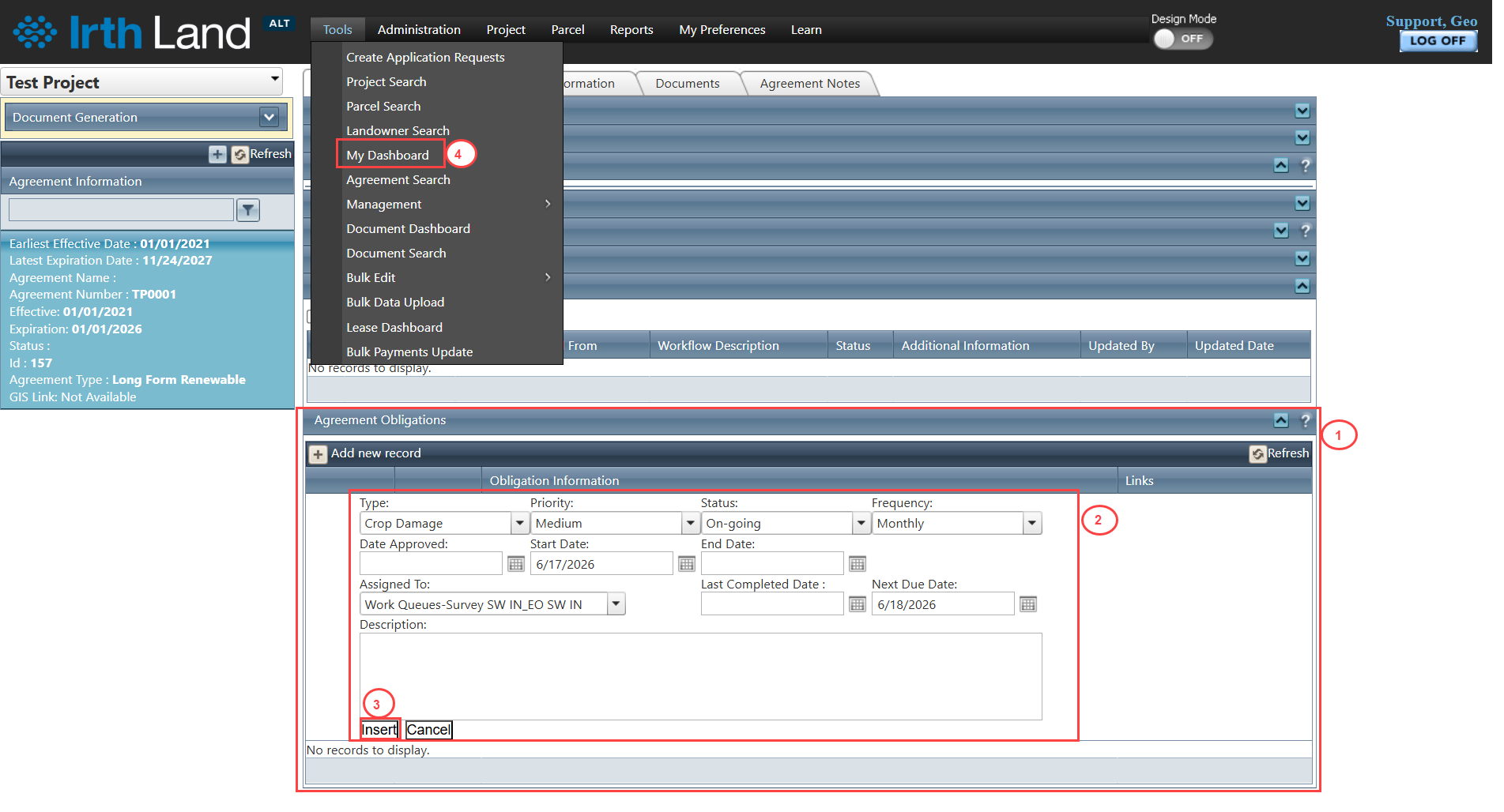
To access this feature: Project > Agreement Manager > Agreement Information Tab > Agreement Obligations Panel
Things to Know:
- Users may receive notifications when:
- They are newly assigned to an obligation.
- An existing obligation is updated.
- The Start Date of an obligation changes.
- Notifications are triggered based on assignment and updates within the panel.
- Key behavior and configuration settings for obligations can be managed via:
Administration > Application Behavior Settings (Refer to Web Administration Manual). - Users can track obligation details such as Obligation Type and Next Due Date directly from:
Tools > My Dashboard
Key Benefits/Use Cases:
- Access Management: Track and enforce restrictions on property access (e.g., restricted zones), ensuring compliance with landowner conditions.
- Advance Notice Requirements: Monitor obligations requiring prior notice (e.g., 3-day notice before site entry), reducing the risk of non-compliance.
- Lease Renewal & Termination Tracking: Stay informed of critical timelines such as 180-day notice requirements before lease renewal or termination, helping avoid missed deadlines.
How It Works:
Follow these steps to view or manage Agreement Obligations:
Step 1: Navigate to: Project > Agreement Manager > Agreement Information Tab > Agreement Obligations Panel
Step 2: Add or update obligations by specifying details such as:
- Obligation Type
- Assigned User
- Start Date
- Next Due Date
Step 3: Save the obligation. Notifications will be sent to assigned users based on creation or updates.
Step 4: To review assigned obligations and upcoming due dates, navigate to: Tools > My Dashboard
Related Features/Next Steps:
FAQ/Troubleshooting:
Q: When do users receive notifications for obligations?
A: Notifications are triggered when an obligation is created, when a user is newly assigned, when updates are made, or when the Start Date changes.
Q: Where can I quickly view my assigned obligations?
A: You can view assigned obligations along with their Next Due Dates in Tools > My Dashboard.
Q: Can multiple obligations be added to a single agreement?
A: Yes, multiple obligations can be added, allowing you to track all conditions associated with an agreement in one place.
Questions? Contact us!

Was this article helpful?
That’s Great!
Thank you for your feedback
Sorry! We couldn't be helpful
Thank you for your feedback
Feedback sent
We appreciate your effort and will try to fix the article