Purpose/Overview
The Project Permits feature is used to manage and track all permits associated with a project. It ensures compliance with regulatory requirements by centralizing permit-related information in one place.
This feature helps users:
- Record and maintain all project-level permits
- Track permit-related issues or actions
- Store supporting documents for easy access and audits
It is primarily intended for project managers, compliance teams, and administrative users responsible for maintaining regulatory documentation.
Navigation Path:
To access this feature: Project > Project Information > Project Details > Project Permits Panel
Things to Know:
- Users must have appropriate permissions to add or edit permit records
- Permit records are maintained at the project level only
- Documents can only be added after the permit record is created
- All permit-related actions and issues are tracked within the same panel
Key Benefits/Use Cases:
- Regulatory Compliance Tracking:
Maintain a centralized repository of all permits to ensure compliance with local and regulatory requirements - Audit Readiness:
Quickly access permit records and supporting documents during audits or reviews - Document Management:
Attach and manage permit-related documents for better organization and traceability
How It Works:
Follow these steps to set up or manage Project Permits:
- Step 1: Navigate to: Project > Project Information > Project Details Tab > Project Permits Panel
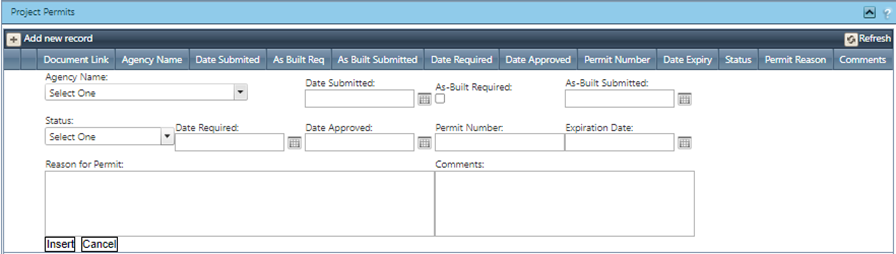
- Step 2: Click on the Add New Record button
- Step 3: Enter all required permit details and click Insert to save the record
- Step 4: To attach documents:
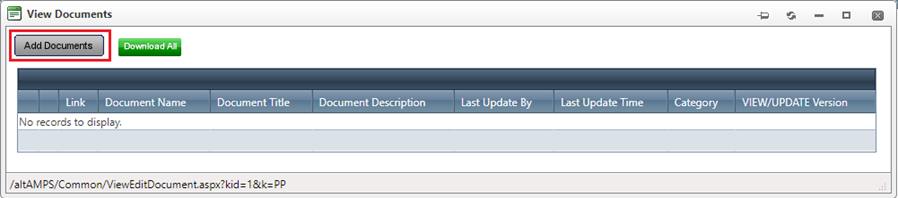
- Click on View/Edit Document link for the created record
- Click on the Add Document button
- Upload the required files
Related Features/Next Steps:
- Project Documents
- Permit Agency
FAQ/Troubleshooting:
Q: Can I add documents before creating a permit record?
A: No, documents can only be added after the permit record is created.
Q: Where can I find all permits related to a project?
A: All permits are available in the Project Permits Panel under the Project Details tab.
Q: Who can add or edit project permits?
A: Only users with the appropriate permissions or roles can create or modify permit records.
Questions? Contact us!

Was this article helpful?
That’s Great!
Thank you for your feedback
Sorry! We couldn't be helpful
Thank you for your feedback
Feedback sent
We appreciate your effort and will try to fix the article