One Call Activity
Purpose/Overview
In this article, you will learn how to use the One Call Activity report in Utilisphere. This report provides a real-time view of the number of tickets received from each One Call Center by hour over a 24-hour period. The report helps users monitor ticket volume, identify activity trends, and track incoming work from participating One Call Centers.
Navigation Path:
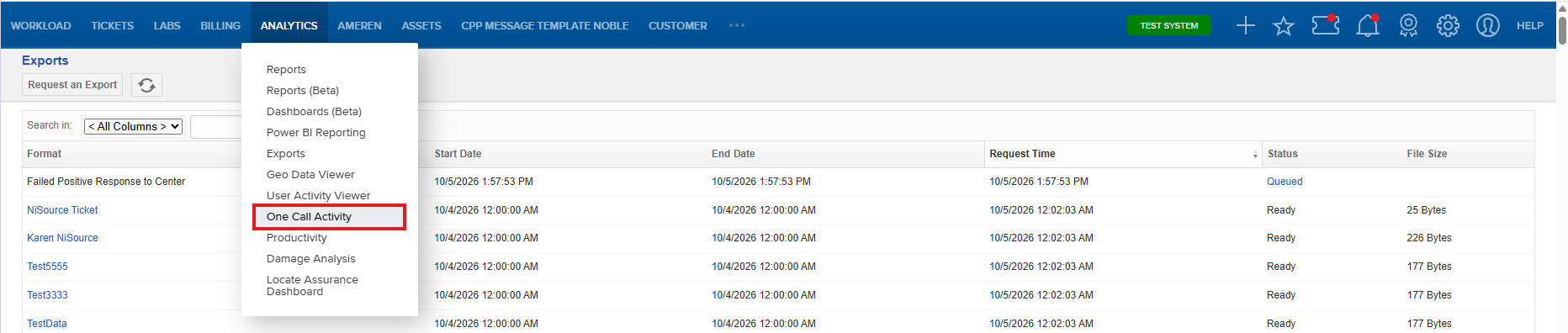
To access this feature, go to: Analytics > One Call Activity
Things to Know:
- The report displays ticket activity by hour for a 24-hour period.
- Report data is based on the selected Receive Date, Registration Code, and Ticket Category filters.
- Default filter settings are applied automatically when the report opens but can be modified as needed.
- The report updates based on the selected filter criteria.
Key Benefits/Use Cases:
- Monitor ticket volume in near real time.
- Track hourly activity received from One Call Centers.
- Identify trends and periods of high incoming ticket activity.
- Filter data by registration code and ticket category to focus on specific operations.
How It Works:
Navigate to Analytics > One Call Activity.
Review the default report settings.
Modify the Receive Date, Registration Code, or Ticket Category filters as needed.
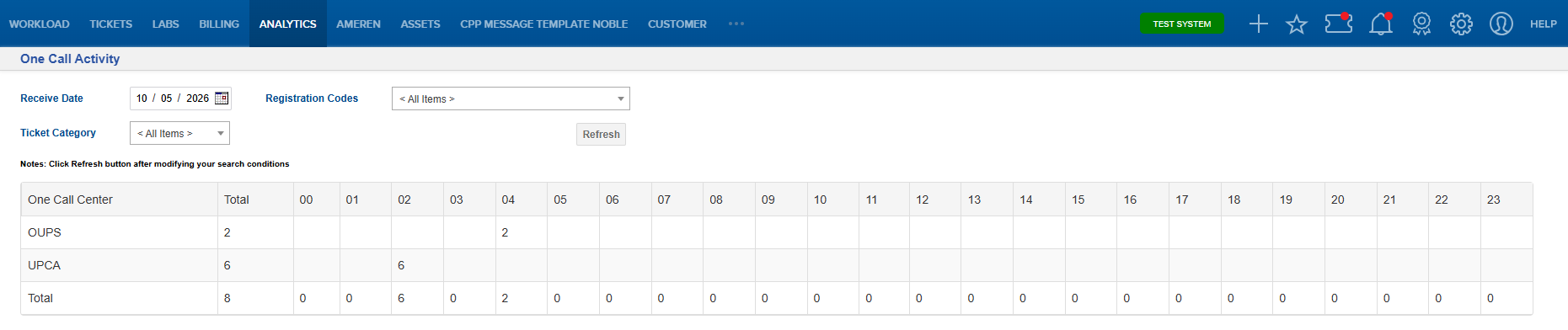
View ticket activity by hour for the selected criteria.
Analyze trends, spikes in ticket volume, or activity across specific One Call Centers.
FAQ/Troubleshooting:
Q: What time period does the report display?
A: By default, the report displays ticket activity for the current date over a 24-hour period.
Q: Can I change the registration codes included in the report?
A: Yes. You can select specific registration codes instead of using the default setting of all available codes.
Q: Can I view only certain ticket categories?
A: Yes. The ticket category filter allows you to limit the report to one or more ticket categories.
Q: Does the report update when filters are changed?
A: Yes. The report refreshes based on the selected filter criteria.
Questions? Contact us!

Was this article helpful?
That’s Great!
Thank you for your feedback
Sorry! We couldn't be helpful
Thank you for your feedback
Feedback sent
We appreciate your effort and will try to fix the article