Export Failed Positive Response to Center
Purpose/Overview
In this article, you'll learn how to generate the Failed Positive Response to Center export in Utilisphere. This export can be used to review and report on responses to a locate center that were not successfully processed.
Navigation Path:
To access this feature, go to: Analytics > Exports > Request an Export

Things to Know:
- The export returns records for failed positive responses to the locate center.
- A date range is required to determine which records are included in the export.
- Export results may vary based on your permissions and available data.
How It Works:
Follow these steps to export:
Navigate to Analytics > Exports > Request an Export.

In the Export Format field, select Failed Positive Response to Center.
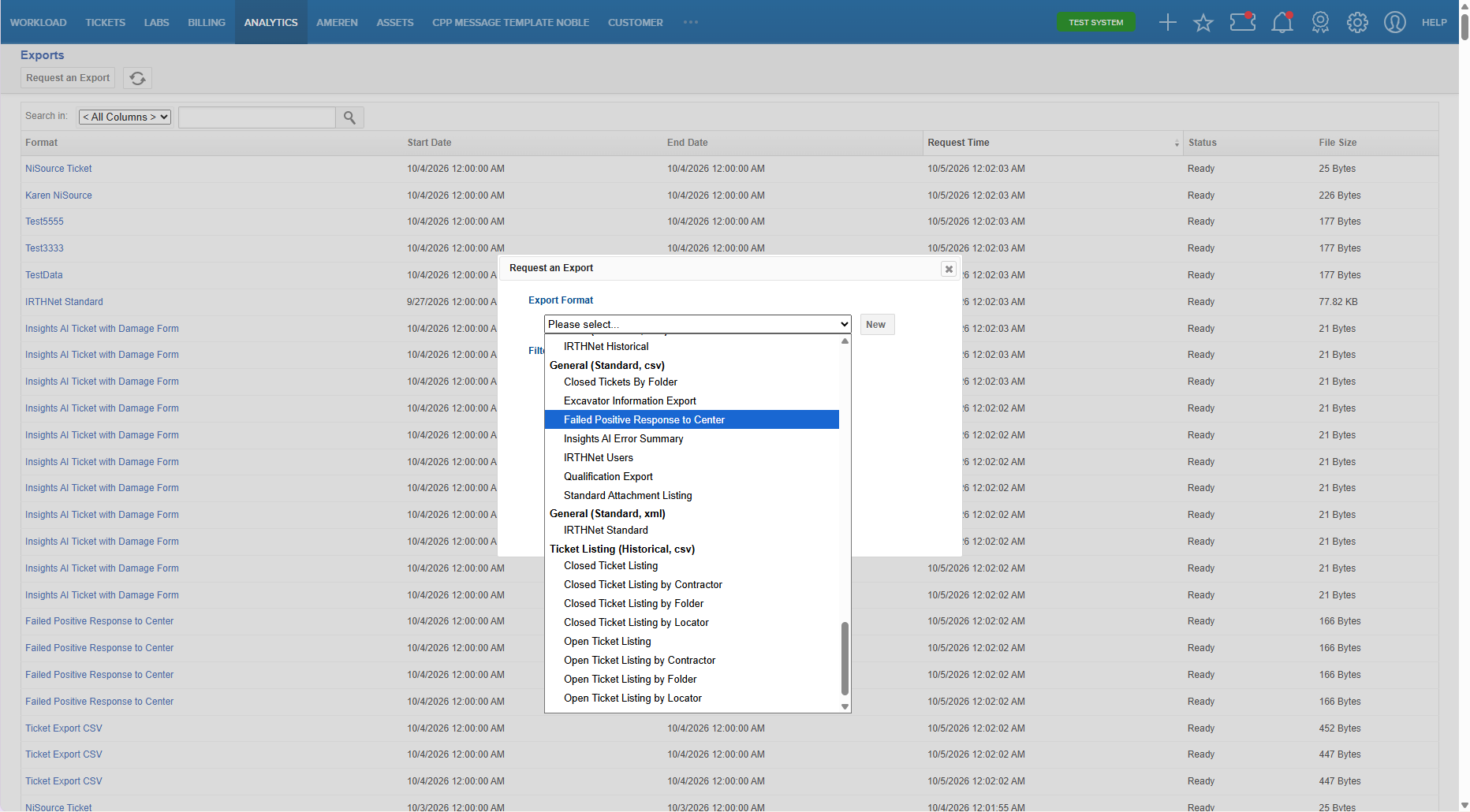
Select the desired Date Range.
Select Save.
FAQ/Troubleshooting:
Q: What does this export show?
A: The export displays records of positive responses that failed to be transmitted or processed by the locate center during the selected date range.
Q: Can I limit the results by date?
A: Yes. Select the appropriate date range when requesting the export to control which records are included.
Questions? Contact us!

Was this article helpful?
That’s Great!
Thank you for your feedback
Sorry! We couldn't be helpful
Thank you for your feedback
Feedback sent
We appreciate your effort and will try to fix the article