Purpose/Overview
The Acquisition tab provides detailed information related to the acquisition process within a parcel record. It enables users to view, manage, and update key acquisition details efficiently in a centralized location.
This feature is designed for users involved in land or parcel management who need to track acquisition progress, maintain accurate records, and ensure that acquisition-related data is up to date. By consolidating this information, it helps improve visibility, reduce manual tracking, and support better decision-making.
Navigation Path:
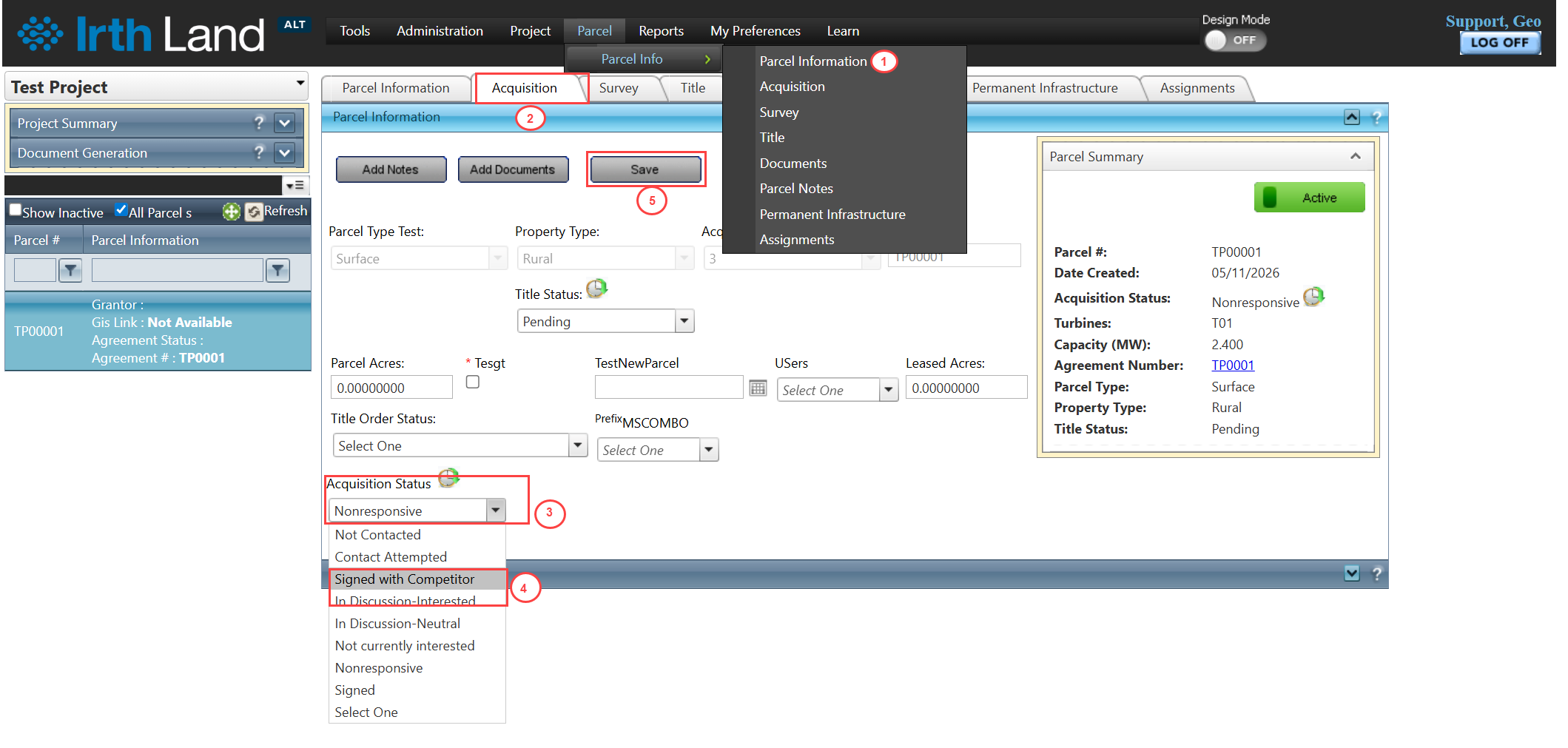
To access this feature: Parcel > Parcel Info > Acquisition Tab
Things to Know:
- Users must have appropriate permissions to view and edit parcel and acquisition details.
- Changes made to acquisition data should be saved to ensure updates are retained.
- The Acquisition Status field reflects the current stage of the acquisition process and should be updated carefully to maintain accurate tracking.
Key Benefits/Use Cases:
- Track Acquisition Progress: Users can quickly view and update the current status of a parcel acquisition, ensuring all stakeholders have accurate progress visibility.
- Centralized Data Management: All acquisition-related details are available in one tab, reducing the need to navigate across multiple sections.
- Improve Data Accuracy: By updating acquisition details directly within the parcel record, users minimize discrepancies and maintain consistent data.
How It Works:
Updating Acquisition Status
Follow these steps to update the acquisition status of a parcel:
- Navigate to: Parcel > Parcel Info > Acquisition Tab.
- In the Parcel Information Panel, locate the Acquisition Status field.
- Click the Acquisition Status dropdown.
- Select the desired status from the list.
- Click Save to apply the changes.
Related Features/Next Steps:
FAQ/Troubleshooting:
Q: Why am I unable to update the Acquisition Status?
A: Ensure you have the required permissions to edit parcel information.
Q: Do I need to save changes after selecting a status?
A: Yes, you must click Save to ensure the updated status is recorded.
Q: Where can I view acquisition details for a parcel?
A: Acquisition details are available under the Acquisition Tab within the Parcel screen.
Questions? Contact us!

Was this article helpful?
That’s Great!
Thank you for your feedback
Sorry! We couldn't be helpful
Thank you for your feedback
Feedback sent
We appreciate your effort and will try to fix the article