Center Comments for Automated Processing
Purpose/Overview
Navigation Path:
To access this feature: Utilisphere > System Management > Administration > Ticket Management > Responses

Things to Know:
Center Comments can be configured for each Auto-Process Rule or Auto-Process Override Rule by adding a specific response to be used by those rules.
The center comment configured on a specific response will be applied to any rule that uses that response.
This feature is intended to provide flexibility in the messaging returned to One Call Centers while preserving the benefits of automated ticket processing.
Administrative permissions may be required to create or modify Auto-Process Rules and Auto-Process Override Rules.
A variation of this feature was previously located in the General > Folders menu and has been relocated to Ticket Management > Responses.
Key Benefits/Use Cases:
- Maintain Consistent Communication: Organizations can send standardized comments with automated responses, ensuring One Call Centers receive clear and consistent information
- Protect Internal Business Logic: Custom Center Comments allow operators to provide meaningful responses without revealing the specific criteria or logic used within automated processing rules
- Support Automated Workflows: By tailoring comments for individual rules, organizations can continue leveraging automation while maintaining positive relationships with One Call Centers and complying with local requirements
- Reduce Operational Costs: Effective automated processing helps minimize the need for manual ticket review and dispatch activities, allowing organizations to manage ticket volume more efficiently.
How It Works:
Follow these steps to setup or enable this feature:
Configure a Center Comment for an Auto-Process Rule
- Navigate to System Management > Administration > Ticket Management > Responses.
- Add a new response or edit an existing response.

- Locate Auto-Response Center Comments within the response configuration and enter the comment you want returned to the One Call Center when the rule automatically processes a ticket.
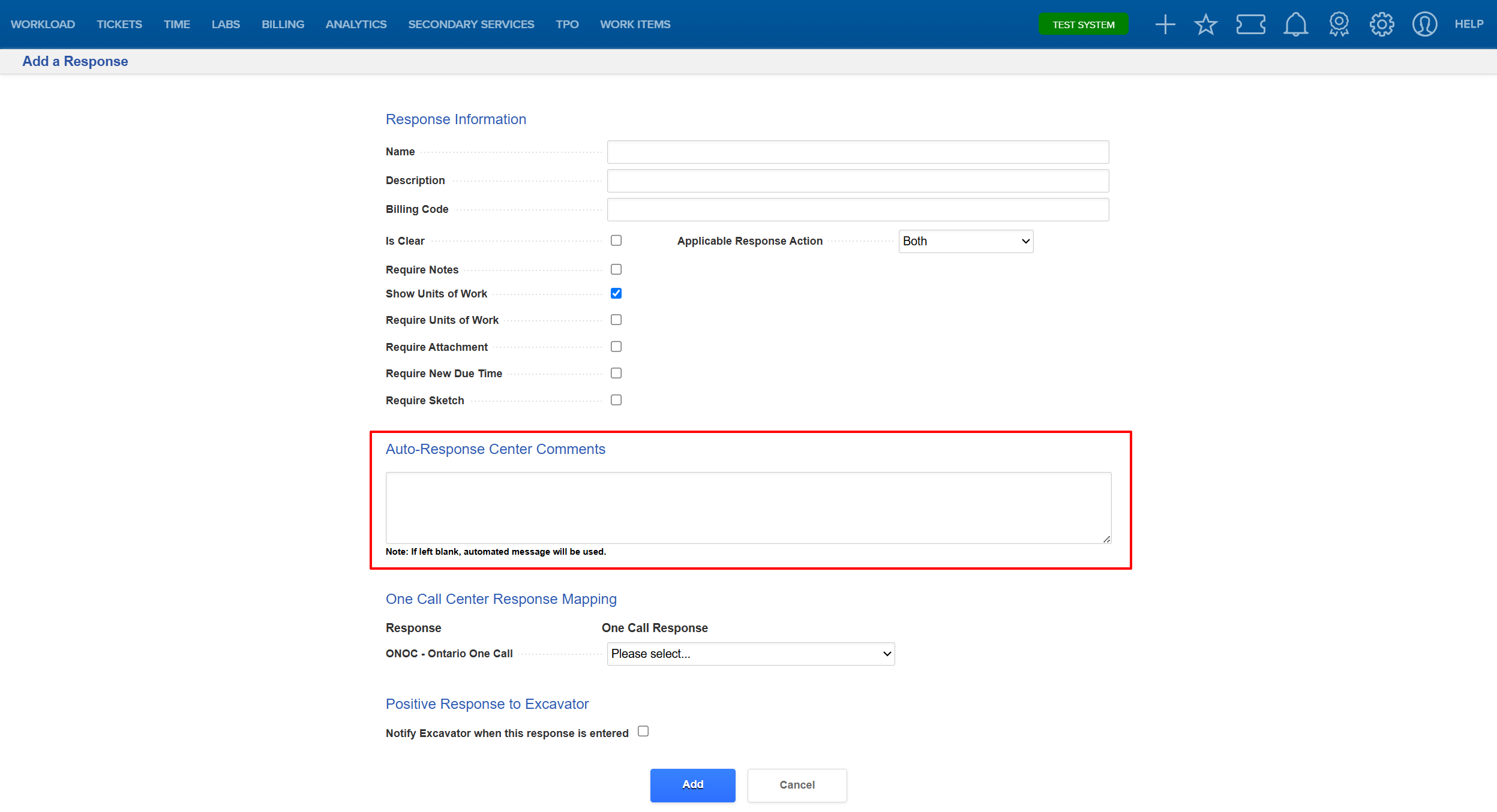
- Save the response.
FAQ/Troubleshooting:
Q: Why would I use a custom Center Comment?
A: Custom comments allow you to provide clear information to the One Call Center without exposing the details of your organization's automated processing logic.
Q: Can different rules have different Center Comments?
A: Yes. Each Auto-Process Rule and Auto-Process Override Rule can have its own unique Center Comment.
Q: Will existing automated processing continue to work?
A: Yes. This enhancement adds the ability to customize the comment sent with automated responses and does not change how the underlying rule processes tickets.
Q: Who can modify Center Comments?
A: Users with the appropriate administrative permissions for managing Auto-Process Rules and Auto-Process Override Rules can configure and update Center Comments.
Questions? Contact us!

Was this article helpful?
That’s Great!
Thank you for your feedback
Sorry! We couldn't be helpful
Thank you for your feedback
Feedback sent
We appreciate your effort and will try to fix the article