Purpose/Overview
The Legal Description panel provides detailed, county-defined information about a parcel. It allows users to capture and maintain the official legal description that defines the exact boundaries and location of a property.
This feature is essential for users involved in land management, leasing, and acquisition processes, as it ensures that property details are recorded accurately and consistently. It helps eliminate ambiguity by storing legally recognized identifiers such as State, County, Township, Range, and Section, or a complete legal description in text format.
By maintaining this information, organizations can ensure compliance, improve documentation accuracy, and streamline legal and operational workflows.
Navigation Path:
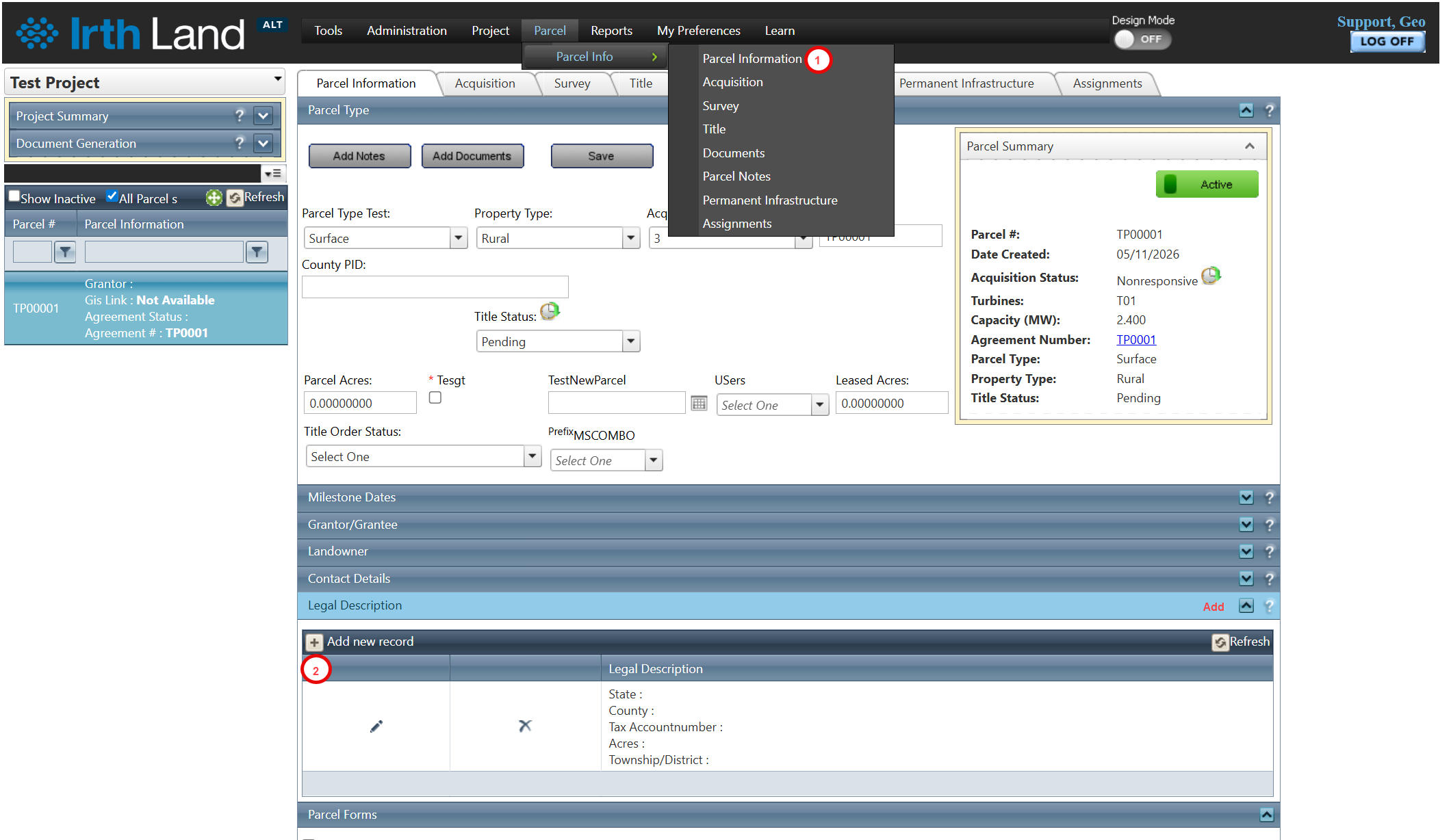
To access this feature: Parcel > Parcel Info > Parcel Information > Legal Description Panel
Things to Know:
- Users can store either a full legal description or short legal components (e.g., State, County, Section, Township, Range).
- Legal description details are typically sourced from county records.
- This information is critical for lease agreements, acquisitions, and legal documentation.
- Multiple legal descriptions can be added and managed within the panel.
Key Benefits/Use Cases:
- Lease Documentation Preparation: Store precise legal descriptions to ensure lease agreements reference the correct parcel boundaries, reducing legal risks.
- Parcel Identification and Verification: Use structured legal attributes (e.g., Township, Range) to accurately identify and verify parcels against official county records.
- Data Standardization Across Records: Maintain consistent and standardized legal data across all parcels, improving reporting and data integrity.
How It Works:
Follow these steps to set up or manage a legal description:
Step 1: Navigate to: Parcel > Parcel Info > Parcel Information tab > Legal Description Panel
Step 2: Click on the Add New Record button to create a new legal description entry.
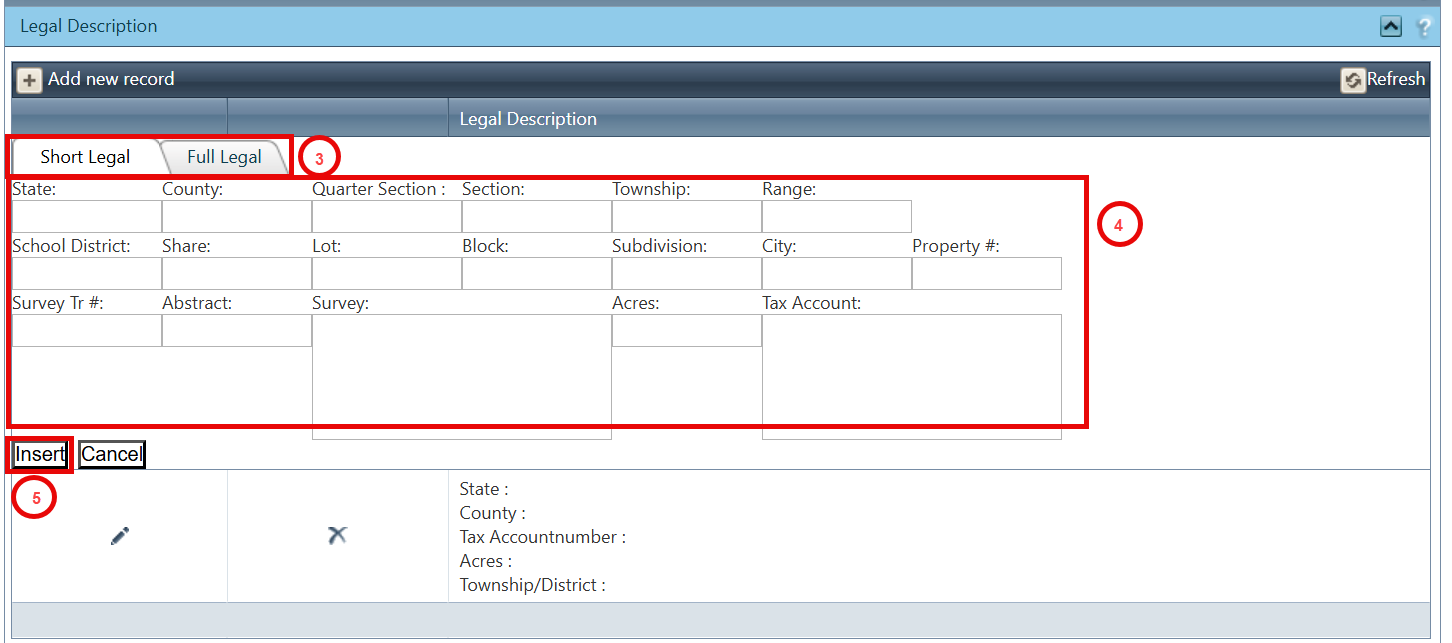
Step 3: Choose one of the following options:
- Short Legal Description (enter individual attributes such as State, County, Section, etc.)
- Full Legal Description (enter complete description in the text field)
Step 4: Enter the required details based on your selection.
Step 5: Click the Insert button to save the record.
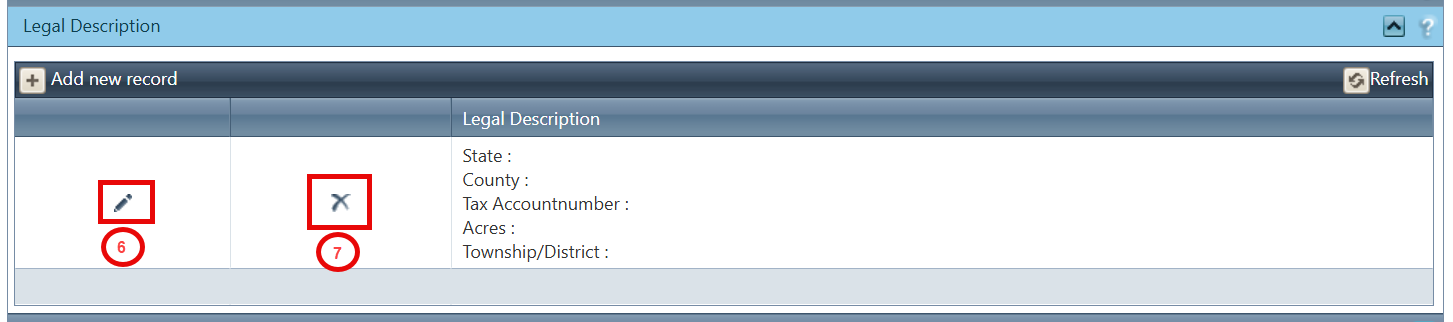
Step 6 (Optional - Edit): Click the pencil icon to edit an existing legal description.
Step 7 (Optional - Delete): Click the X icon to remove a legal description.
Related Features/Next Steps:
FAQ/Troubleshooting:
Q: Can I store both full and short legal descriptions for the same parcel?
A: Yes, depending on your requirements, you can store either or both formats as separate records.
Q: What should I do if I don’t have a full legal description?
A: You can use the short legal option to input available components like State, County, Section, etc.
Q: Why is the legal description important?
A: It provides the legally recognized definition of a property’s boundaries, which is essential for leases, acquisitions, and compliance with county records.
Questions? Contact us!

Was this article helpful?
That’s Great!
Thank you for your feedback
Sorry! We couldn't be helpful
Thank you for your feedback
Feedback sent
We appreciate your effort and will try to fix the article