View INFO-EX Ticket Details in English or French
Purpose/Overview
In this article, you’ll learn how to use the French Language Display feature, which lets you switch the field labels on INFO-EX Ticket Details between English and French. INFO-EX Ticket Details were previously shown only in English, which left a gap for users who need or prefer to work in French, especially organizations committed to bilingual service delivery and operating under language requirements.
A language dropdown on the INFO-EX Ticket Details page lets users switch field labels between English and French. The selection is saved as a user preference for future sessions. The feature is intended for users at companies that receive INFO-EX tickets and have the French-language toggle enabled. Users get a bilingual experience without disrupting existing ticket notification processes: notifications sent to third parties continue to be delivered in the existing English format, so current recipients see no change.
Navigation Path:
To access this feature: Utilisphere > Ticket > INFO-EX Ticket Details > Language dropdown

Things to Know:
Permission requirements or role restrictions
- The feature is behind a company-level toggle and is not available by default.
- The dropdown appears only on INFO-EX tickets that have French translations available.
- No additional user permissions are required once the toggle is enabled for the company.
Browser / Platform variations
- The default language follows the user’s browser language preferences, in any supported browser (Edge, Chrome, Firefox, etc.).
- If French is ranked above English in the browser’s preferred languages, INFO-EX Ticket Details open in French by default.
- If French is not ranked above English, or neither is listed, Ticket Details open in English, the site default.
- Once a user manually selects a language from the dropdown, that choice is saved to their user preferences. It overrides the browser settings until the user changes it again.
Known caveats and limitations
- Translation happens when the ticket is parsed (received). Tickets already in the system before the toggle was enabled are not translated.
- Translation applies only to INFO-EX tickets. Tickets from other sources are not translated.
- If the toggle is later turned off, INFO-EX tickets received while it was on keep their French translations and remain viewable in the UI. Tickets received after it is turned off are not translated.
- Only the fields listed in the table below are translated. Any field not listed displays in its original language.
- Ticket notifications to third parties are always sent in English.
Key Benefits/Use Cases:
View Ticket Labels in French: Users who need or prefer to work in French can view supported ticket field labels in French without changing the underlying ticket information.
Use Your Browser Language Preference: Users can prioritize French in their browser settings so qualifying tickets initially display French field labels.
Switch Languages When Needed: Use the language dropdown on the Ticket Details page to switch between English and French.
Save Your Preferred Language: After you manually select English or French, Utilisphere saves the selection to your user preferences and uses it during future sessions.
Maintain Existing Notification Processes: Changing the display language does not change the English format used for downstream ticket notifications.
How It Works:
Follow these steps to set up or enable:
Confirm the feature is enabled
The French-language toggle must be enabled for your company. Contact your system administrator or support team to request it. Only INFO-EX tickets received after the toggle is enabled will contain translations.
Open an INFO-EX ticket with translations available
Go to Tickets and open an INFO-EX ticket received after the toggle was enabled. A language dropdown showing English and French appears on the INFO-EX Ticket Details page.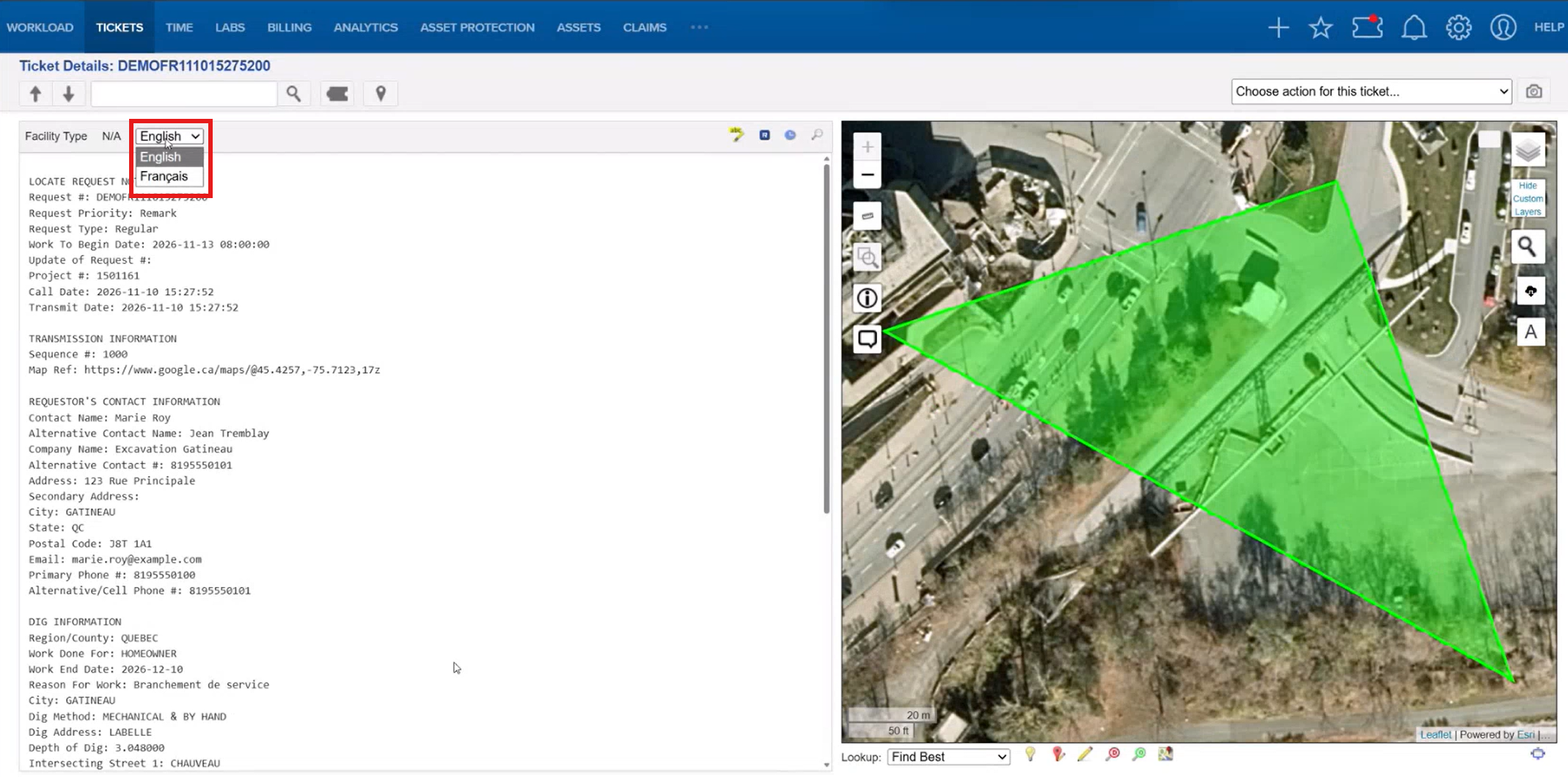
Choose your display language
You have two options:
- Set French as your default via your browser: Add French to your browser’s preferred languages and rank it above English. Refresh the page and INFO-EX Ticket Details open in French by default.
- Switch ad hoc from the dropdown: Select French or English in the language dropdown. The field labels update immediately, and your selection is saved to your user preferences so it applies to future sessions, overriding the browser default.
Switch back anytime. Select English from the dropdown at any time. The new selection is saved the same way.
Supported English and French Field Labels
| English | French |
|---|---|
| Locate Request Notification | Avis de demande de localisation |
| Code | Code |
| Request # | # Demande |
| Request Priority | Priorité de la demande |
| Request Type | Type de demande |
| Work To Begin Date | Date de début des travaux |
| Update of Request # | Mise à jour # demande |
| Project | Projet |
| Call Date | Date d'appel |
| Transmit Date | Date de transmission |
| Transmission Information | Renseignements sur la transmission |
| Sequence | Séquence |
| Map Ref | Référence cartographique |
| Requestor's Contact Information | Coordonnées du demandeur |
| Contact Name | Nom du contact |
| Alternative Contact Name | Autre Contact |
| Company Name | Nom de l'entreprise |
| Alternative Contact # | Autre Numéro de contact |
| Address | Adresse |
| Secondary Address | Adresse secondaire |
| City | Ville |
| State | État/Province |
| Postal Code | Code postal |
| Courriel | |
| Primary Phone # | Numéro de téléphone principal |
| Alternative/Cell Phone # | Numéro de téléphone secondaire/cellulaire |
| Dig Information | Renseignements sur les travaux |
| Region/County | Région/Comté |
| Work Done For | Travaux effectués pour |
| Work End Date | Date de fin des travaux |
| Reason For Work | Raison des travaux |
| City | Ville |
| Dig Method | Méthode d'excavation |
| Dig Address | Adresse d'excavation |
| Depth of Dig | Profondeur d'excavation |
| Intersecting Street 1 | Rue transversale 1 |
| Intersecting Street 2 | Rue transversale 2 |
FAQ/Troubleshooting:
Q: I don’t see the language dropdown on my INFO-EX ticket. Why?
A: The dropdown appears only when French translations exist for the ticket. Check that (1) the French-language toggle is enabled for your company, (2) the ticket is an INFO-EX ticket, and (3) the ticket was received after the toggle was enabled. Tickets already in the system before then are not translated.
Q: Why are some fields still in English even though I selected French?
A: Only the fields in the translated field labels table are translated. Any field not listed displays in its original language.
Q: I set French as my browser’s preferred language, but tickets still open in English. What’s wrong?
A: French must be ranked above English in your browser’s language preferences. Refresh the page after updating the settings. Also, if you previously picked a language from the dropdown, that saved preference overrides the browser setting. Select French from the dropdown to update it.
Q: I selected English in the dropdown, but my browser prefers French. Which one wins?
A: Your dropdown selection wins. It is saved to your user preferences and takes precedence over browser defaults until you change it.
Q: Will the third parties who receive ticket notifications see French?
A: No. Notifications to third parties continue to be delivered in English, so existing recipients are not disrupted.
Q: Can older INFO-EX tickets be translated to French?
A: No. Translation happens at parsing, when the ticket is received, so tickets received before the toggle was enabled are not translated.
Q: The toggle was turned off for our company. Do we lose the French translations?
A: No. INFO-EX tickets received while the toggle was on keep their translations and remain available in the UI. New tickets received after it is turned off are not translated.
Questions? Contact us!

Was this article helpful?
That’s Great!
Thank you for your feedback
Sorry! We couldn't be helpful
Thank you for your feedback
Feedback sent
We appreciate your effort and will try to fix the article