Purpose/Overview
The Project Contacts feature allows users to store and manage contact information for key individuals or organizations associated with a project. These contacts typically include high-level entities such as contract companies, title companies, attorneys, or other important stakeholders relevant at the project level.
Unlike parcel-specific contacts, Project Contacts are maintained centrally for overall project management and communication. This ensures that all critical stakeholders are easily accessible and consistently referenced throughout the lifecycle of the project.
The feature helps streamline communication, improve coordination, and maintain accurate records of all involved parties.
Navigation Path:
To access this feature: Project > Project Information > Contacts tab
Things to Know:
- Project Contacts are separate from parcel-level contacts and apply to the entire project.
- Users can either select from existing contacts or create new ones while adding a contact.
- Contact records typically include name, address, contact details, contact type, and other relevant attributes.
Key Benefits/Use Cases:
- Centralized Stakeholder Management: Maintain a single source of truth for all key project stakeholders, improving visibility and accessibility.
- Improved Communication: Quickly access contact details for contract companies, attorneys, or title companies to ensure smooth coordination.
- Data Reusability: Reuse existing contact records across projects, reducing duplicate data entry and maintaining consistency.
How It Works:
Follow these steps to add and manage Project Contacts:
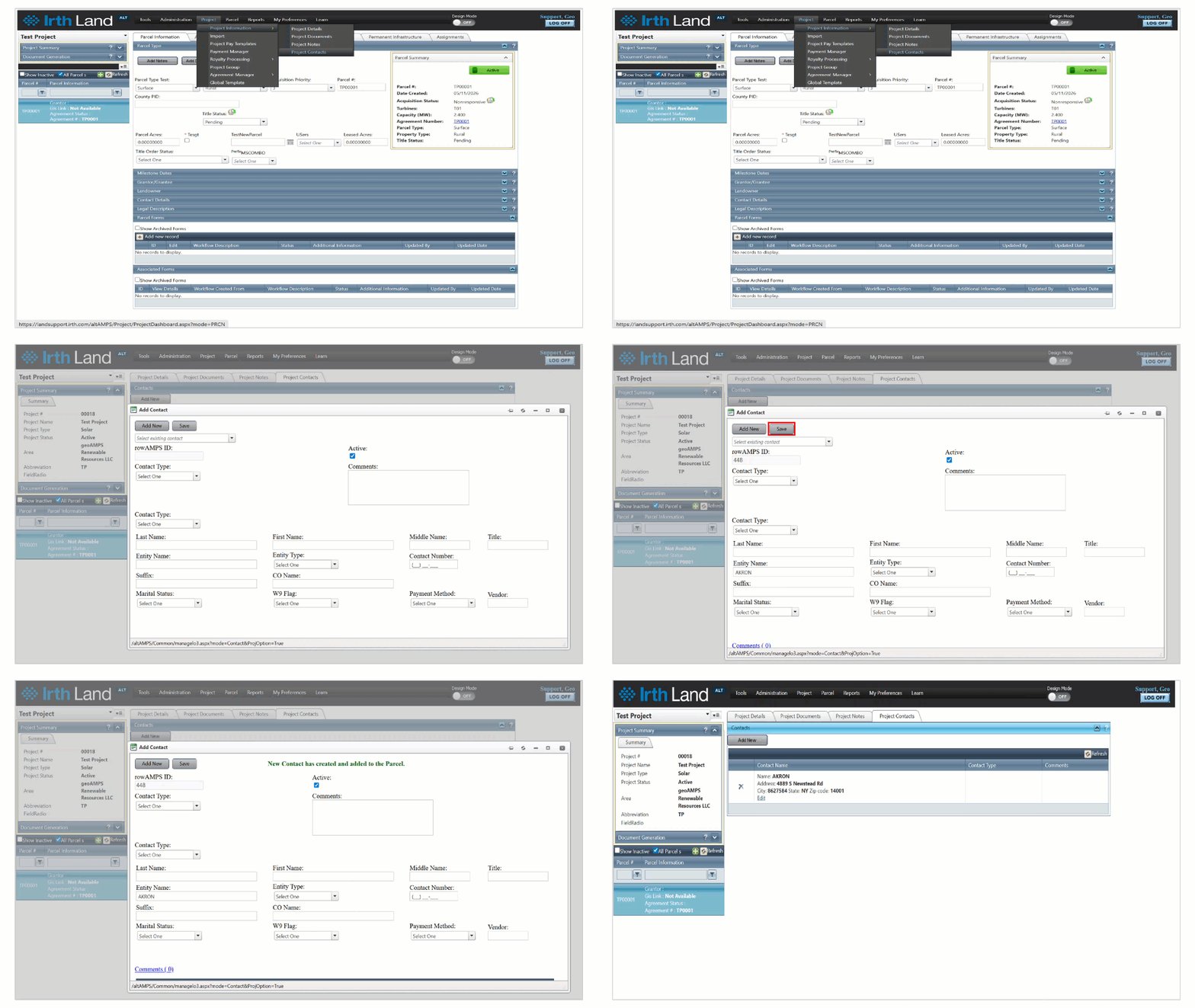
Step 1: Navigate to Project > Project Information > Contacts tab.
Step 2: Click the Add New button to create a new contact.
Step 3: In the Add Contact pop-up window:
- Select an existing contact or
- Enter details to create a new contact
Step 4: Once all information is entered or verified, click Save to add the contact to the project.
FAQ/Troubleshooting:
Q: Can I use an existing contact instead of creating a new one?
A: Yes, you can select an existing contact from the system while adding a new Project Contact.
Q: What type of contacts should be added here?
A: High-level stakeholders such as contract companies, title companies, attorneys, and other project-related entities should be added.
Q: Why is my contact not visible in the list?
A: Ensure the contact has been saved correctly or check if it exists in the system before creating a new one.
Questions? Contact us!

Was this article helpful?
That’s Great!
Thank you for your feedback
Sorry! We couldn't be helpful
Thank you for your feedback
Feedback sent
We appreciate your effort and will try to fix the article