Is there a way to have a designation for an attachment that is not specific to gas or electric? Currently, if we attach a photo/screenshot of a text message or phone call, there isn't a way to find that specific attachment without opening up each attachment. That's ok when we only have 30 or fewer attachments but becomes a challenge when a ticket has over 100 pictures. I would also like to use this when we fill out meet sheets mandated by Xcel Energy.
0 Votes
3 Comments
Sorted by
S
Stuthi HegdeIrth
6 months ago
Thanks for the explanation, Michael. That makes sense.
In both the classic UI and new UI, users can add a Description to attachments and sort attachments by that column, which can help with organization and identifying attachments. However, these descriptions are currently not searchable. Do you think that functionality would be helpful here?
Appreciate the feedback!
0 Votes
M
Michael Moschini
6 months ago
Let's say a locator has a text conversation with a contractor but takes a pic of his phone with the tablet. I was looking to see if there was a way that a) we could create a tag in the Docs & Attachments that would indicate this was a text convo instead of the normal picture designation or b) any kind of AI built into the system could scan the photo and tag it automagically. Techs do sometimes name their attachments as a text or phone screenshot and I can find them while scrolling through all the attachments, but if there are 100's of photos, then finding those screenshots is a lot of scrolling. A type of tag would help zero in on those.
0 Votes
S
Stuthi HegdeIrth
6 months ago
Hi Michael,
Thanks for your question! I have two follow ups:
1. Could you clarify what you mean by 'designations for attachments'?
2. When looking for specific attachments, are you looking for a specific file name/description/date range?
Is there a way to have a designation for an attachment that is not specific to gas or electric? Currently, if we attach a photo/screenshot of a text message or phone call, there isn't a way to find that specific attachment without opening up each attachment. That's ok when we only have 30 or fewer attachments but becomes a challenge when a ticket has over 100 pictures. I would also like to use this when we fill out meet sheets mandated by Xcel Energy.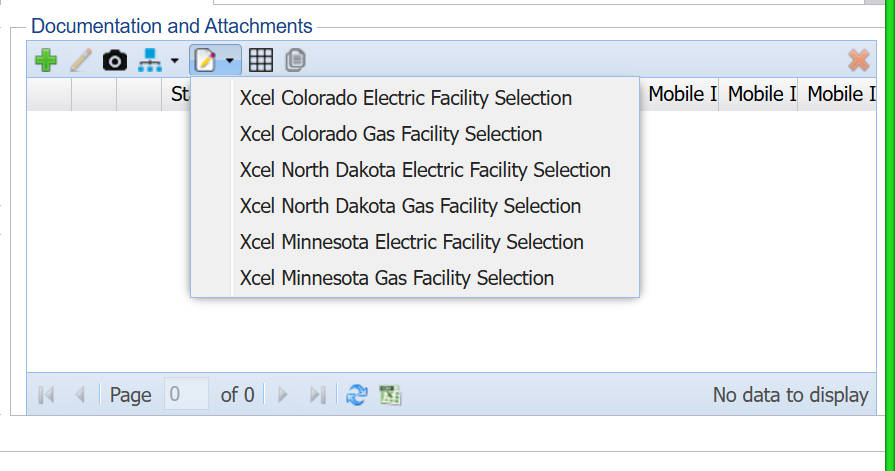
0 Votes
3 Comments
Stuthi Hegde Irth 6 months ago
Thanks for the explanation, Michael. That makes sense.
In both the classic UI and new UI, users can add a Description to attachments and sort attachments by that column, which can help with organization and identifying attachments. However, these descriptions are currently not searchable. Do you think that functionality would be helpful here?
Appreciate the feedback!
0 Votes
Michael Moschini 6 months ago
Let's say a locator has a text conversation with a contractor but takes a pic of his phone with the tablet. I was looking to see if there was a way that a) we could create a tag in the Docs & Attachments that would indicate this was a text convo instead of the normal picture designation or b) any kind of AI built into the system could scan the photo and tag it automagically.
Techs do sometimes name their attachments as a text or phone screenshot and I can find them while scrolling through all the attachments, but if there are 100's of photos, then finding those screenshots is a lot of scrolling. A type of tag would help zero in on those.
0 Votes
Stuthi Hegde Irth 6 months ago
Hi Michael,
Thanks for your question! I have two follow ups:
1. Could you clarify what you mean by 'designations for attachments'?
2. When looking for specific attachments, are you looking for a specific file name/description/date range?
0 Votes
Login or Sign up to post a comment