Contract Locator Response Protocol- All environments outlined
Purpose/Overview
This guide provides contract locators with instructions for configuration awareness, response requirements, and response submission formats for IRTHNet. It is intended to be shared directly with vendor contract locators.
1. Overview
Contract Locators may respond to locate tickets on behalf of an IRTHNet member when authorized. This document explains both the process context and the required response protocol.
2. Creating a Contract Locator and Contract Locator Information Report
Contract Locators are configured by the Member company in IRTHNet. Once created, this information is provided to the Contract Locator:
To respond successfully, provide the contract locator information report.
Required information provided by the Member: Contract Locator Response Information report should be provided. See Add Contract Locator
- Authentication Code
- Response Codes
- Production Response Addresses (based on where the member client logs in):
- Prod CL -> https://cl.irth.com/Irthnet/WebServices/IrthNetService.asmx
- Prod Main -> https://irth.com/Irthnet/WebServices/IrthNetService.asmx
- Prod Sunshine -> https://sunshine.irth.com/Irthnet/WebServices/IrthNetService.asmx
- Prod AZ811 -> https://az811.irth.com/Irthnet/WebServices/IrthNetService.asmx
- Prod Canada -> https://can.irth.com/Irthnet/WebServices/IrthNetService.asmx
- Response Protocol (XML format)
3. Ticket Identifier Requirements
Ticket notifications must include the Standard IRTHNet Header and Ticket Identifier, which must be referenced in the response.
4. Facility Type (When required)
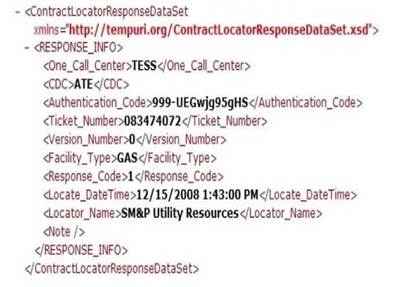
Some One Call Centers require a Facility Type to be included in the response.
➡ CONDITIONAL: Facility_Type must exactly match the facility configuration in IRTHNet
5. Attachments
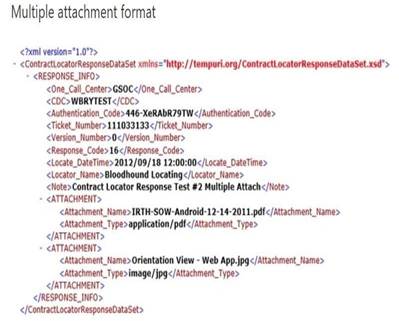
Responses may include supporting documentation such as PDFs or images. When attachments are included, the following fields are required:
- Attachment
- Attachment_Type (valid MIME type)
- Attachment_Name (file name with extension)
6. Additional Fields Required for Positive Response
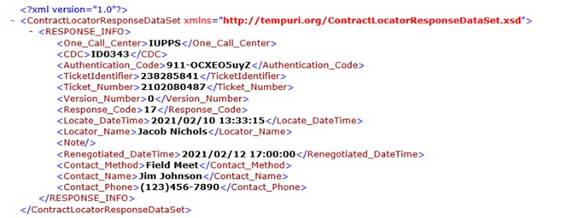
Some One Call Centers require explanations or renegotiation details.
Required when renegotiating due times:
- Renegotiated_DateTime (yyyy/mm/dd hh:mm:ss)
- Contact_Method (Phone Call or Field Meet)
- Contact_Name
- Contact_Phone
Additional Center Information and/or Required Comments
- One Call Centers such as (but not limited to) Indiana 811 or JULIE require additional information when sending specific responses.
- This information must be sent in the <Addl_PosResp_Center_Info> tag of the XML.
- The content inside the <Addl_PosResp_Center_Info> tag must be responded to in JSON or Plain Text.
- The choice of either JSON or Plain Text is based on the requirements set by UtiliSphere in compliance with the center’s rules and regulations.
- Information regarding example responses and how to populate this field can be provided by the member in UtiliSphere through the following instructions.
- Gear > Administration > Ticket Management > Responses > Additional Positive Response Fields Documentation
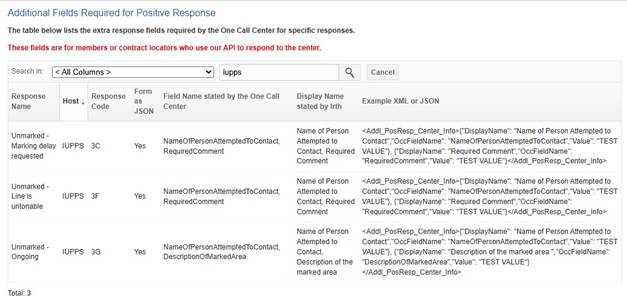
- Example with JSON -> Indiana 811, code 3C
<Addl_PosResp_Center_Info>
{
"DisplayName": "Name of Person Attempted to Contact",
"OccFieldName": "NameOfPersonAttemptedToContact",
"Value": "TEST VALUE"
},
{
"DisplayName": "Required Comment",
"OccFieldName": "RequiredComment",
"Value": "TEST VALUE"
}
</Addl_PosResp_Center_Info>
• Example with Plain Text -> Michigan 811, code 001 <Addl_PosResp_Center_Info>TEST VALUE</Addl_PosResp_Center_Info>
7. Contract Locator Response Information Report
Members generate this report to provide vendors with authentication codes and response code mappings.
8. Add Contract Locator Responses
The following operations are supported. For a formal definition, please review the Service Description.
- AddContractLocatorResponseAttachment
- AddContractLocatorResponseAttachmentByToken
- AddContractLocatorResponses
- AddContractorAttachment
- AddContractorAttachmentByToken
- AddContractorExcvPosRespConfirmation
- AddMemberAttachment
- AddMemberAttachmentByToken
- AddTicket
- FindContractorsByCompanyID
- FindMemberCompanyTokenByCDC
- SendAudit
- SendMessage
- SendResponse
- SendTicket
- SetDigAreaIntersectFlag
- ValidateResponseToMemberConfig
Appendix A – XML Response Formats (Reference)
<ContractLocatorResponseDataSet xmlns="http://tempuri.org/ContractLocatorResponseDataSet.xsd"> <RESPONSE_INFO>
<One_Call_Center>7ESS</One_Call_Center>
<CDC>ATE</CDC>
<Authentication_Code>999-UEGwjg9sGs</Authentication_Code>
<Ticket_Number>80347407</Ticket_Number>
<Version_Number>0</Version_Number>
<Facility_Type>GAS</Facility_Type>
<Response_Code>1</Response_Code>
<Locate_DateTime>12/15/2008 1:43:00 PM</Locate_DateTime>
<Locator_Name>SM&P Utility Resources</Locator_Name>
<Note />
</RESPONSE_INFO>
</ContractLocatorResponseDataSet>
<ATTACHMENT>
<Attachment_Name>IRTH-SOW-Android-12-14-2011.pdf</Attachment_Name>
<Attachment_Type>application/pdf</Attachment_Type>
</ATTACHMENT>
<ATTACHMENT>
<Attachment_Name>Orientation View - Web App.jpg</Attachment_Name>
<Attachment_Type>image/jpg</Attachment_Type> </ATTACHMENT>
Questions? Contact us!

Was this article helpful?
That’s Great!
Thank you for your feedback
Sorry! We couldn't be helpful
Thank you for your feedback
Feedback sent
We appreciate your effort and will try to fix the article